Docs / Your first automation
Build a function
For the parts of the work that must come out the same every time.
What a function is
A function is a fixed list of steps that runs top to bottom and gives the same answer for the same input. Your agent calls it like a tool.
A step does one of three things:
| Example from the invoice agent | |
|---|---|
| Calls an operation on a connection | Fetch the purchase order matching this invoice number |
| Calls a model | Read a free-text delivery note and pull out the quantity received |
| Works on data it already has | Compare the invoice lines to the PO lines and list the differences |
How to decide: function or agent?
Ask what happens if you run it twice with the same input.
If there is exactly one right answer, it is a function. Comparing an invoice to a purchase order has one right answer. So does converting a currency, formatting a date, or looking up a supplier's payment terms. Putting that in an agent means paying a model to work out something that has a correct answer, and getting a slightly different result each time.
If it needs weighing up, it is the agent. Deciding whether a £340 overage is worth querying with the supplier or writing off depends on the contract, the supplier relationship and the size of the account. There is no single right answer, and that is what an agent is for.
Most real work is both. The invoice agent judges; the invoice-comparison function does the arithmetic it judges on. That split is the normal shape, not a special case.
Why not just a tool?
An operation is one call to one system: fetch this, post that. A function is several of those plus the work in between.
Reach for a function when the agent would otherwise have to make three calls and then do something with the results. Fetching the invoice, fetching the PO, and then comparing them is three operations and one comparison. As a function, that is one thing the agent calls and one answer it gets back. Fewer moving parts, fewer chances to do it differently.
How you actually build one
You talk to the Function Builder, the agent docked on the left of the Functions workspace. Describe what you want in plain language and it writes the function.
Two other things on screen help you check its work:
The document. The whole function written out, step by step, in the order it runs. This is the thing to read when you want to know exactly what it does. It is the definitive version.
The diagram. A visual map of the same thing, on the Preview tab. Useful for seeing the shape at a glance, especially where a step branches. It is not something you edit, it is a picture of what the document says.
So the loop is: describe what you want, read the document to check it, run it, and go back to the builder to change anything.
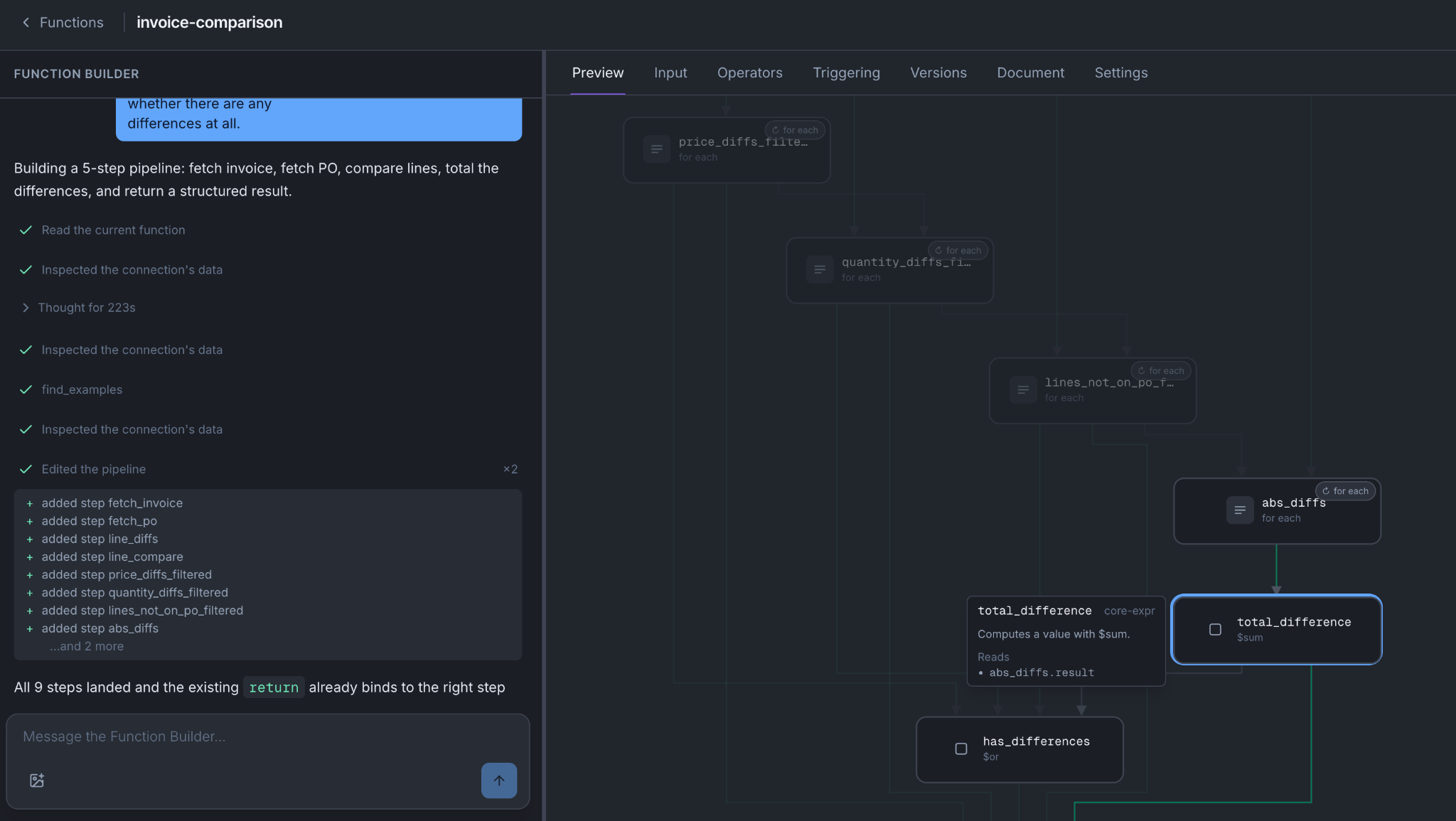
The invoice-comparison function:
| Step | What it does |
|---|---|
| 1 | Operation: fetch the purchase order for this invoice number |
| 2 | Data: pull the line items out of the response into a plain list |
| 3 | Data: pull the invoice lines into the same shape |
| 4 | Data: match them up and list every line where quantity or price differs |
| 5 | Data: return the list of differences, the total value of them, and whether there are any at all |
No judgement anywhere. Same invoice, same PO, same answer, every time.
Notice step five. It returns whether there are any differences at all, which is exactly what the agent's script needs to decide whether to bother with the contract check. That is the pattern worth copying: have the function return the thing the script has to decide on.
Testing it
The Preview tab is a live run harness. Give it a real invoice number, run it, and each step lights up in the diagram as it goes, so you see how far it got and what it returned.
How to do it
- Functions → New. Describe what you want to the Function Builder.
- Read the document it produced.
- Run it on the Preview tab with real input.
- Press Save changes when it is right. That creates a version, not live yet.
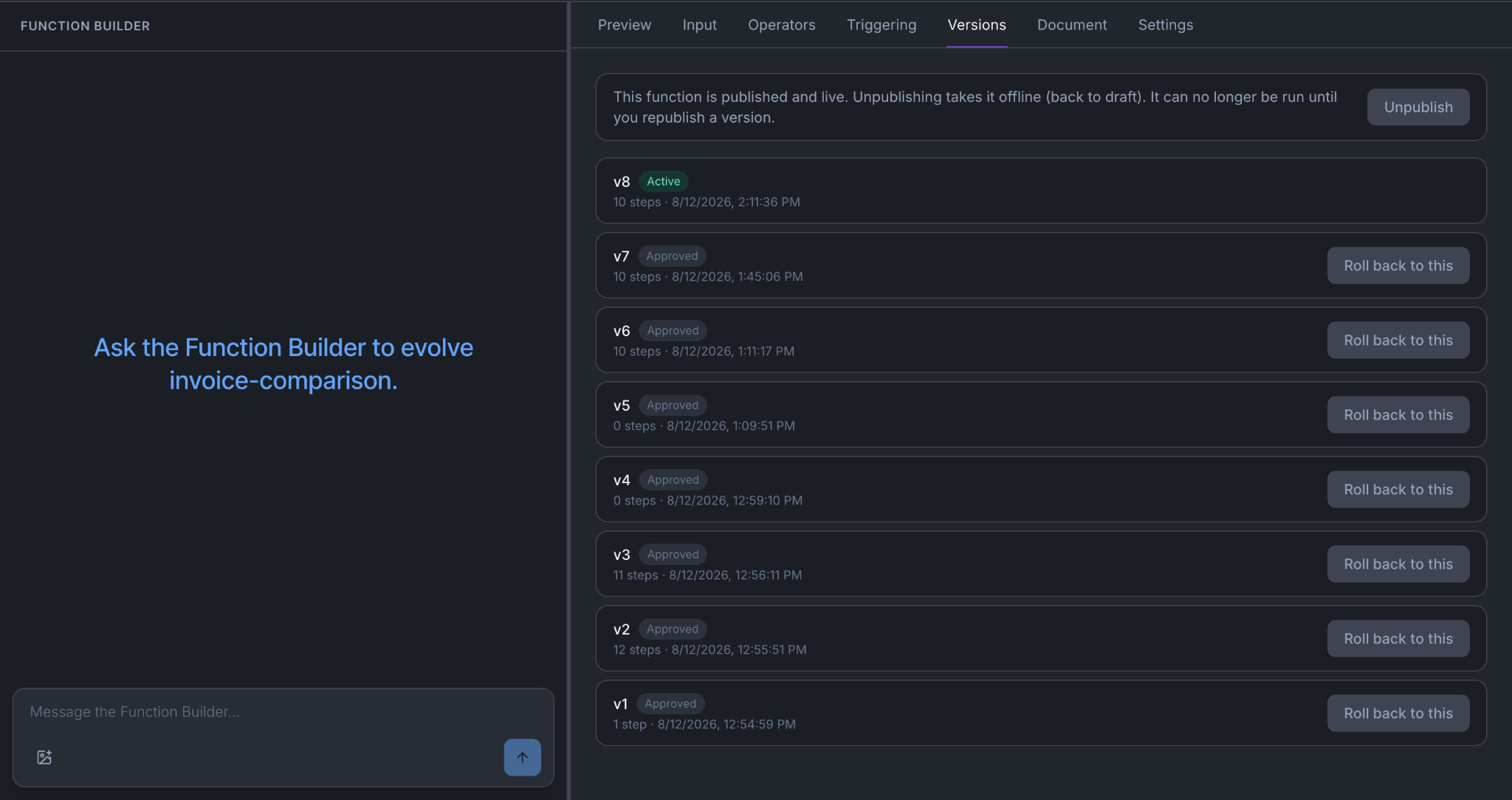
- Publish it on the Versions tab.
- Give it to your agent: the agent's Resources tab, then Apply & make live.
Until step five nothing runs outside the harness, and until step six no agent can call it. See What saving actually does.
The tabs
| Tab | What it is for |
|---|---|
| Preview | Run it and watch it. Where you will spend your time |
| Input | What it takes in |
| Versions | Publish, and roll back by re-activating an earlier one |
| Document | The whole function written out. The definitive version |
| Settings | Name, description, delete |
Things to be aware of
A failed step stops the run, unless you mark that step as optional, in which case its error gets recorded and the next step carries on. Stopping is the default so that a failed fetch does not quietly leave you comparing against an empty list.
Retries are set per step. How many attempts in total, and which kinds of failure are worth retrying. Rate limits, server errors, timeouts and network failures are retried by default. A rejected request is not, because it will be rejected identically the second time.
A step can repeat across a list. Give it a list of 200 invoice numbers and it runs once per number, eight at a time, up to a thousand. A failing item gets recorded as failed in the results and the rest carry on.
Two clocks and a ceiling. Each attempt has a timeout you set. Each run has a deadline: about a minute when somebody is waiting for the answer, about five minutes when nothing is. And each run can reach outside about a hundred times, which is a backstop against a badly shaped loop turning into a thousand requests to somebody else's system. Items in a repeat count individually, so 100 invoices at one call each is your whole budget. See Limits and run behaviour.
When it does not work
A step returns nothing and everything after it is empty. Look at that step. Usually the operation is scoped to something other than what you assumed. Run it on its own from the connection.
It works in the UI but the agent never calls it. Check its published. Check its assigned to the agent. Check its applied and made live (so not in draft state).
It runs out of time on a big list. Use a repeat rather than a loop, or make the unit smaller and run the agent more often.
You're done when
- It runs green in the harness on real input, including one awkward case.
- It is published and assigned to an agent that has been made live.
- You can say what it returns that the script will use to decide something.