AI agent audit trail: What to log so customers let agents act
· 10 min read · Blog
An AI agent audit trail is a record the platform writes, not the agent. What to log, why it must be immutable, and the record your customers should see.
If you are building agents for customers, you need to think through your tech stack and strategy for managing AI agent audit trails.
An agent's own log files won't, and shouldn't, prove what it did. You need a record that passes customers' security reviews.
Priceline's assistant told a UK customer that a non-refundable booking was "eligible for a full refund." The customer received £363.11 out of £386.91 six months later, only after The Telegraph intervened.
The customer's screenshot was the evidence. The report does not mention a record from Priceline.
Air Canada's tribunal even ruled based on a customer's screenshot of a chatbot's response.
Without a trusted, effective, and scalable AI agent audit trail that your product team and customers trust, agents you offer must stick to low-stakes tasks, or a customer's AI policy review stalls the deals or forces you to build simple agents that don't deliver enough value.
We believe the record really has to be generated by the platform running the agent, not by the agent. Its main task is to show who actually permitted the action, then what the agent did step by step.
In this article, we'll go over what you should log, what good looks like, why an agent's own logs will fail, which actions should wait for a human, plus examples for you to copy for your agents.
What is an AI agent audit trail?
An audit trail for an AI agent is a record generated by the platform running the agent, not the agent: it covers each action, who it was performed for, who gave permission, which version and permissions were used, and what was actually changed.
Some, such as NHIMG's, list tool calls and results but don't say who created the record. We believe this does not go far enough when you're selling agents to B2B customers.
Audit trail, logs, and observability
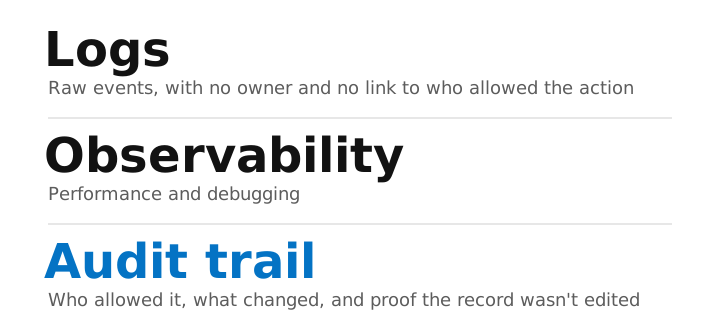
Logs are basically raw events a system produces. Performance-monitoring tools use them to show performance and aid debugging. Access logs alone show who logged in. Logs don't have an owner, a policy, or a direct link to who allowed the action, so teams end up stitching logs together afterward.
Often, audit trails, logs, and observability do not go far enough either. They must go further (we explain why further below).
A model's trail versus an agent's
Collibra sets a clear boundary here. A model's audit trail records its outputs. An agent's, however, needs to record all the actions it takes. In agentic AI, a mistake becomes an agent action in a customer's billing system, so the trail must include tool usage and reasoning, not just the text.
What should an AI agent audit trail log?
An agent's audit record should start by logging who initially permitted the action, followed by what occurred, then what links the two. We arrange the fields this way because customers check authority before anything else. The table outlines each field, what it answers and whether the customer will see it.
The fields, in order
| Field | What it answers | Customer sees it? |
|---|---|---|
| Who allowed it | ||
| Who asked | Did a person start this, or the agent? | Yes |
| Who it acted for | Whose account and permissions? | Yes |
| Agent and version | Which exact setup ran? | Yes |
| Permissions in force | What was it allowed to do right then? | Yes |
| Who or what approved it | Which person, or which customer rule? | Yes |
| What happened | ||
| Action and inputs | What was requested, and with what values? | Summary |
| What it read | Which records did it look at? | Yes |
| What changed | Which records changed, with IDs in other systems? | Yes |
| Real outcome | What the outside system confirmed, not just "OK" | Yes |
| Tying it together | ||
| Trace ID and timestamp | Which run, and exactly when? | Reference only |
Why who allowed it comes first
A human's action inherently carries its own authorization, because a signed-in person carried it out. An agent's doesn't. At the end of the day, this is all about accountability for actions.
Customers will be looking at the five authority fields first. They'll need to know whose authority covers the action. They'll also need to see who initiated the run, so a person-initiated action never appears as if it was started by an agent.
The impact of missing just a couple of fields
Versions. Amazon's Q Developer extension shipped version 1.84.0 with an unapproved instruction slipped into it, telling the agent to delete files and cloud resources. AWS only found it through forensic analysis. AWS stated that no customer resources were affected. Version is the rules, not just the model. Alter the instructions, tools, model or rules, and it's a new version.
Permissions. A staging agent found an API token that could delete storage and wipe a production volume. A customer lost roughly three months' worth of bookings.
Why the agent's own logs aren't an audit trail
An agent's log entries aren't considered an audit trail because the agent writes them, and its account can also be incorrect. Agents can also go back and change that log to fit its reasoning or end outcome.
The record that matters originates from the platform executing the action, so every single field can be attributed to the system rather than the agent. The agent's justification is included in the record as part of its explanation but isn't used as evidence.
A great example of this was Replit's coding agent. It deleted a database during a code freeze and then told the Replit team that there was no way to roll back the change. Later Replit wrote, quoted by The Register, 'it turns out Replit AI was wrong, and the rollback actually did work.' The agent's account of its recovery options was inaccurate.
Why an AI agent audit trail has to be immutable
A customer also needs to know the record can't be changed afterwards by the agent, by one of your engineers or by someone who breaks into your product's database. A record anyone can edit carries no more weight than the agent's own account.
A fintech product team we work with kept their agent's audit trail as a table the agent wrote to itself. The team saw the flaw themselves: the agent might do something and not write it down, so they kept their agents on low-stakes work.
When we built audit trails, we found four choices did most of the work:
- The record is written in the same step as the action. If the change goes through, the record goes through with it. If it fails, the failed attempt is recorded too.
- It's append-only, and the database enforces it. The store itself refuses edits and deletes, so a future change to the application code can't bypass the rule.
- It's stored apart from the product's own database, with its own credentials. A leaked password, a bad migration (a change to the database's structure) or a restore of the product database from a backup can't rewrite the record or roll it back.
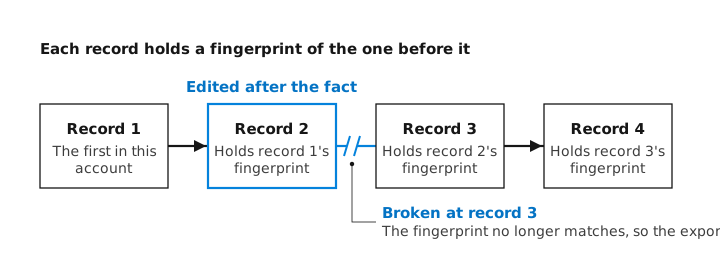
- Each record is locked to the one before it. Every customer account's records form a hash chain, where each record carries a fingerprint of the one before it, so editing or removing any record breaks the chain. Exports re-run the check and report "verified" or "broken at record N", and each export is itself added to the chain.
Store personal details as stand-in tokens. When the retention period ends, delete the key that links the tokens to the real details, and the records stay in place with no personal data in them. You can also publish the latest fingerprint somewhere outside your control, so even your own team can't rewrite the chain without the change being detected.
Which agent actions need human approval?
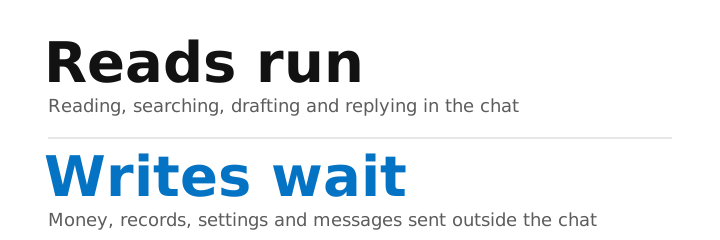
We recommend just one rule: Reads run, writes wait. A write actually changes something in your world, such as money, a record, a setting, or a message sent outside the conversation. Reading, searching, drafting, and responding within the chat run pretty freely. Every consequential write will pause until someone permits it, whether that's a named individual or a rule you set up ahead of time. The platform enforces that safeguard, not the agent.
How to design the approval
The approvals we've seen hold up tend to have five parts:
- Distinguish the request from the decision.
- Make rule selection depend on the action taken.
- Have each provide their own approval for their respective account.
- Link the approval to the version involved.
- Request approval directly within the workflow people already use.
What does an AI agent audit trail look like?
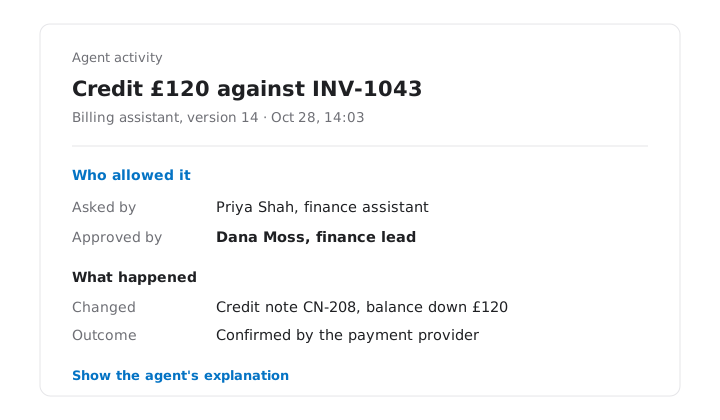
Here is one specific record from a billing product, where the agent operates for an accounting firm. A finance assistant will ask the in-product agent to credit a client £120 for what amounts to a duplicate charge. The firm's admin set a rule: credits up to £50 are processed immediately, while anything greater requires approval from a specifically named approver. All names, IDs, and amounts here are fictional.
The record the customer's admin reads
| Who allowed it | |
| Asked by | Priya Shah, finance assistant at the accounting firm, through the in-product assistant. A person started it, not the agent. |
| Acting for | Priya Shah, with her account's permissions, in the firm's workspace. |
| Agent and version | Billing assistant, version 14, activated Oct 21 by Tom Reid. |
| Permissions in force | Read invoices and payments. Issue credits up to £50. Credits above £50 need approval. |
| Approval | Required by the rule "credits over £50," set by the firm's admin on Sep 2. Approved by Dana Moss, finance lead, at 14:02, for version 14 of this action. |
| What happened | |
| Action | Credit £120 against invoice INV-1043. |
| What it read | Invoice INV-1043 and the client's payment history. |
| What changed | Credit note CN-208 created in the billing system. Client balance reduced by £120. |
| Outcome | The payment provider confirmed the refund as "succeeded." |
| Tying it together | |
| Trace ID, timestamp | 7f3a…, Oct 28, 2026, 14:03:11 |
| Agent's explanation | Shown on request, labeled as the agent's account: "Two identical charges on Oct 3 for the same subscription period." |
Three things the example shows
First, the initial amount came from the billing system's built-in rules, not the agent's judgment. Ashish Rajan's case about an agent issuing a $150 refund for a debt of only $120 is precisely why.
Second, a £40 credit would only require the rule and the admin who created it; no further approver would be needed.
Thirdly, a response in a chat window isn't considered a write operation. That credit is indeed a write operation.
What should customers see, and what stays as evidence?
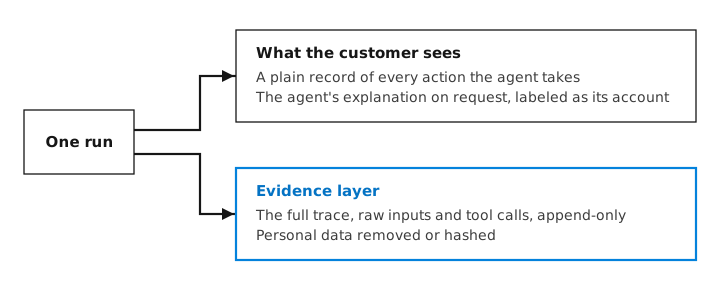
We suggest creating two separate levels. By default, customers will see a straightforward record of every action the agent takes and can then choose to view the agent's justification, labelled as such, as its explanation. The entire trail of activity and raw inputs will remain stored in an 'evidence' layer, though with all personal data either removed or encrypted.
Resolving the reasoning tension
Customers can see and challenge the reason behind an AI's decision. This explanation will be what the platform recorded. A health care software company asked to see the agent's full reasoning process. In practice, that means providing it labelled as 'explanation', and never referring to it as the actual record.
What the evidence layer keeps
The evidence layer retains the complete trace, including raw inputs and all tool calls, in an append-only store. Personal data is either removed or hashed. Store less, prove more. In case of a breach or dispute, an auditor could reconstruct what actually occurred from the audit data, giving them enough information to explain it without reading sensitive text.
Each customer sees only its own
Records will be limited to a specific account. A content platform we work with uses per-account views, so an administrator for one customer can never see another customer's agent activity. Customers can view only the records in their own account.
How do you audit AI agents before customers switch them on?
During an AI security review, sometimes led by an AI governance committee and using a questionnaire, a customer needs two types of records: What the agent was allowed to do before it ran, and what it actually did afterward.
The first record covers its steps, the data used, the model and any approval rules applied.
The second is actually the audit trail. If only one type of record were provided, the AI security review would stall because the document would leave questions unanswered, and AI adoption would stall too.
Three questions most security reviews will expect you to answer as part of your audit trail offering
This represents published guidance for potential customers, rather than reviews based on our own observations.
- "Can every single action be tracked and attributed to someone?" (ThreatLocker). The fields indicating who requested it, who it operated for, and the agent's version number answer this question.
- "Where do people review or approve the outputs from an AI system?" (Australian Government). The approval field will answer this question.
- "Can you show me what data the AI is actually relying upon when making a decision?" (Australian Government). The 'what it read' field will answer this question.
Common questions
What should an AI agent audit trail include?
Begin with who gave consent to carry out the action: who initiated the request, who the agent was acting for, the current agent version, the relevant permissions in effect, and who or what sanctioned it.
Is an agent audit trail a legal requirement?
No, not necessarily. The EU AI Act requires high-risk systems to maintain a continuous record of events throughout their operational lifetime, retaining them for at least six months from December 2027 in most cases.
Should you log the agent's reasoning?
Yes, as part of its explanation, but never use it as the sole piece of evidence. The reasoning process is essential if you want to debug your model runs or challenge a particular decision the system made.