Docs / Managing what's live
Change something that's already live
For editing an agent that colleagues are using, without breaking their week.
What this is
The invoice agent has been running for a month. Finance now wants supplier queries to include the contract clause in the text. That is a change to something people depend on, so the questions are: what happens the moment you save, who is affected and when, and how do you get back if it goes wrong.
What keeps a history and what does not
| Thing | Keeps versions? | How you undo a change |
|---|---|---|
| Functions | Yes | Re-activate an earlier version |
| Scripts | Yes | Re-activate an earlier version |
| Widgets | Yes | Re-activate an earlier version |
| An agent's resource assignments | Yes | Re-activate an earlier version |
| An agent's prompt content | Yes | Re-activate an earlier version |
| The agent's own record | No | There is nothing to rewind. It has a status: draft, published or archived |
| Connections | No | An operation is enabled or it is not. Change it and it is changed |
Two of those rows are the ones people get wrong.
- The agent's own record is not versioned. Its status says whether people can use it, which is a switch rather than a history. So "roll the agent back" is never a single action. You roll back the thing you changed: the script, the prompt content, the resource assignments.
- Connections have no history at all. Revoking an operation takes effect immediately for everything using it, including a conversation already under way. That is what makes it the emergency lever, and it is also why there is no undo beyond enabling it again.
Rollback
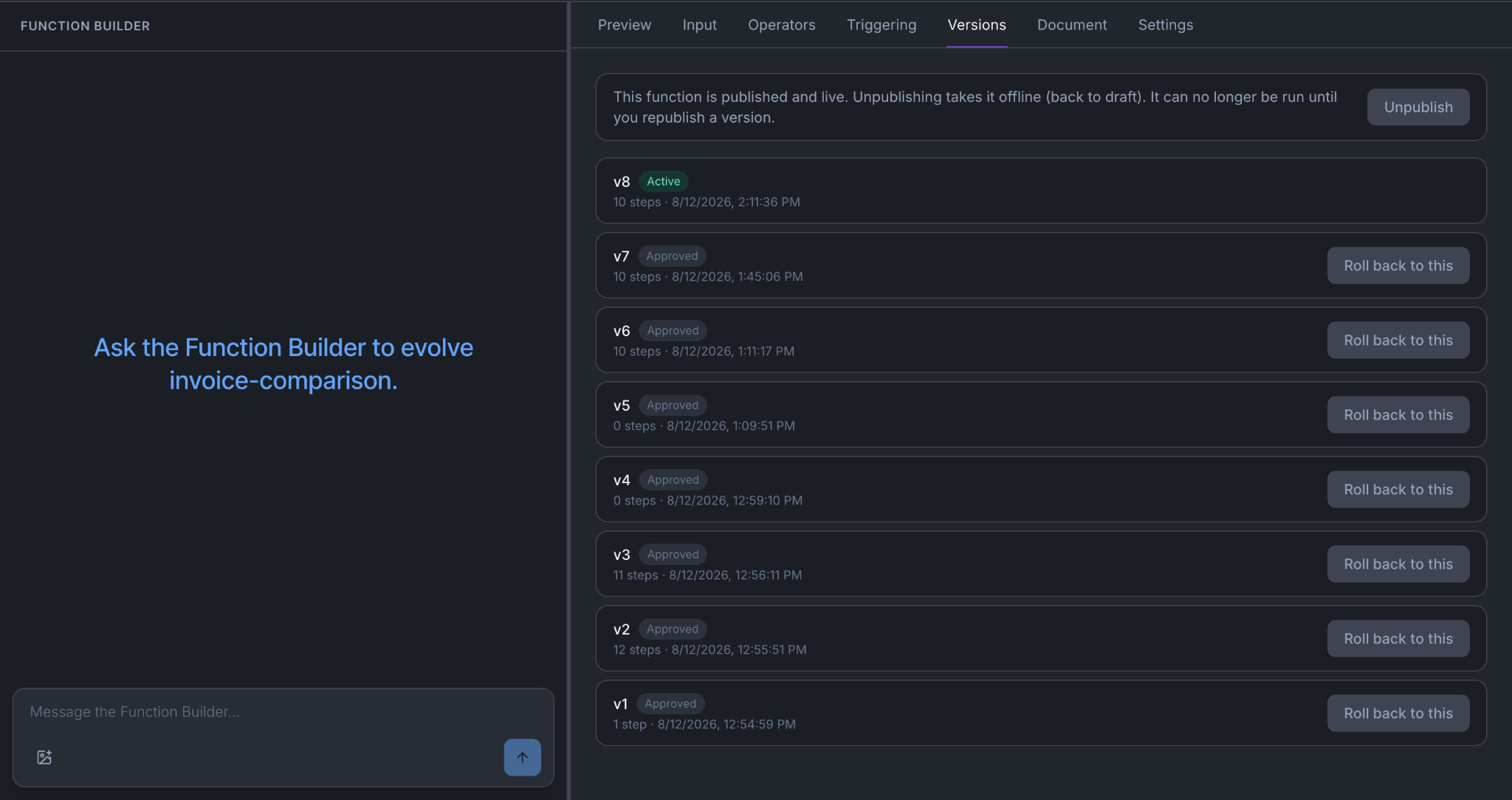
Go to the Versions tab of the function, script or widget, find an earlier version, and re-activate it. Nothing is ever deleted.
What happens when you change each thing
| What you change | When it takes effect | Who is affected, and when |
|---|---|---|
| System prompt | Immediately. The text is also kept as a version you can roll back to | New conversations. Anyone mid-conversation keeps what they started with |
| Script | You press Save changes to create a version, then publish it | New conversations, once published |
| Agent settings | Immediately | New conversations |
| Resources tab | Saved to a draft. Live only after Apply & make live | Nobody until you press it, then new conversations |
| A function | Save changes creates a version, then publish | Every agent that calls it, on their next call |
| A widget | Save changes creates a version, then publish | New conversations |
| Enabling or revoking an operation | Immediately | Everything, including conversations already running |
| Connection login details | Immediately | Everything, including conversations already running |
The pattern: anything on the connection is instant and everywhere; anything on the agent reaches people on their next conversation. If you need access stopped this minute, go to the connection.
One more thing about functions. Publishing a new version of the invoice-comparison function changes behaviour for every agent that calls it, not only the one you had in mind. Before you publish, check which agents hold it in Observability → Resources.
Test somewhere that is not live
An environment is a named partition inside your org: Demo, Test, Production. Any member can create one, list them and switch between them. Nobody can rename, archive or delete one. Every org starts with one called original.
Use a second environment for anything you would not want a colleague to meet first:
- Switch to Test and make the change there.
- Point the finance connection at a sandbox copy if the change touches a write. Operations execute for real during a test run, so a real connection means a real supplier query.
- Run it on invoices you know the right answer for.
- Make the same change in Production once it holds up.
Changes do not travel between environments on their own. Test is where you find out, not where you build the thing you then ship.
Run the behavior tests afterward
Every change above is a change to how the agent behaves.
- Open the agent's Testing tab and press Run all.
- Read the failures first. A change that fixes one thing and breaks another is the normal way this goes wrong.
- Add a criterion for what you just changed, if none covers it.
- Run it unpinned first to check it means what you think, then pin it.
A published agent's new version goes live only if every pinned criterion passes. Not most of them, and a better average never overrides a single failure. So the tests are not a report you read afterwards; they decide whether your change reaches anybody.
When it does not work
- You published and nothing changed. Either it was a Resources change still sitting in the draft, or the people testing it are in conversations that started before you published.
- A version will not activate. It never passed its check. Read the reason on the Versions tab, fix it in the current draft, and publish a new version rather than trying to force the old one.
- Your change works and a pinned criterion now fails. The criterion cannot be edited or deleted, on purpose. Either your change is wrong, or the criterion describes behaviour the business no longer wants, in which case retire it with a reason and pin a replacement.
You're done when
- You can say which of your changes were instant, which needed publishing, and which needed Apply & make live.
- You have re-activated an earlier version of something at least once, so you know where the button is before you need it in a hurry.
- Every pinned criterion passes.
- The people who use the agent know it changed.