Docs / Managing what's live
Where your agent can be reached
Versions decide how your agent behaves. Availability decides whether people can reach it, and where from.
What this is
You will find availability in the Availability section of the Versions & Availability tab.
Availability sits outside versions so that switching an agent off happens straight away, without anyone having to activate anything. Availability changes take effect as soon as you press Save, and they do not create a new version. For everything that does create a version, see Agent versions.
The Available switch
Most of the time this switch is all you need. Turn it on and your agent can be reached. Turn it off and it cannot be reached from anywhere, which gives you a quick way to take an agent out of service.
Switching it off does not stop work already in progress straight away. It blocks new runs, and it stops a multi-step run at its next step:
- A turn that is already running finishes, including any actions it takes.
- A multi-step run waiting on a timer, an approval or an outside event cannot continue. When it tries to resume, it is refused.
- That paused run is not closed immediately. It shows as active until the platform gives up on it, after about an hour.
If you need something stopped this minute, revoke the operation on the connection instead. That is checked every time it runs.
Choosing where it can be used
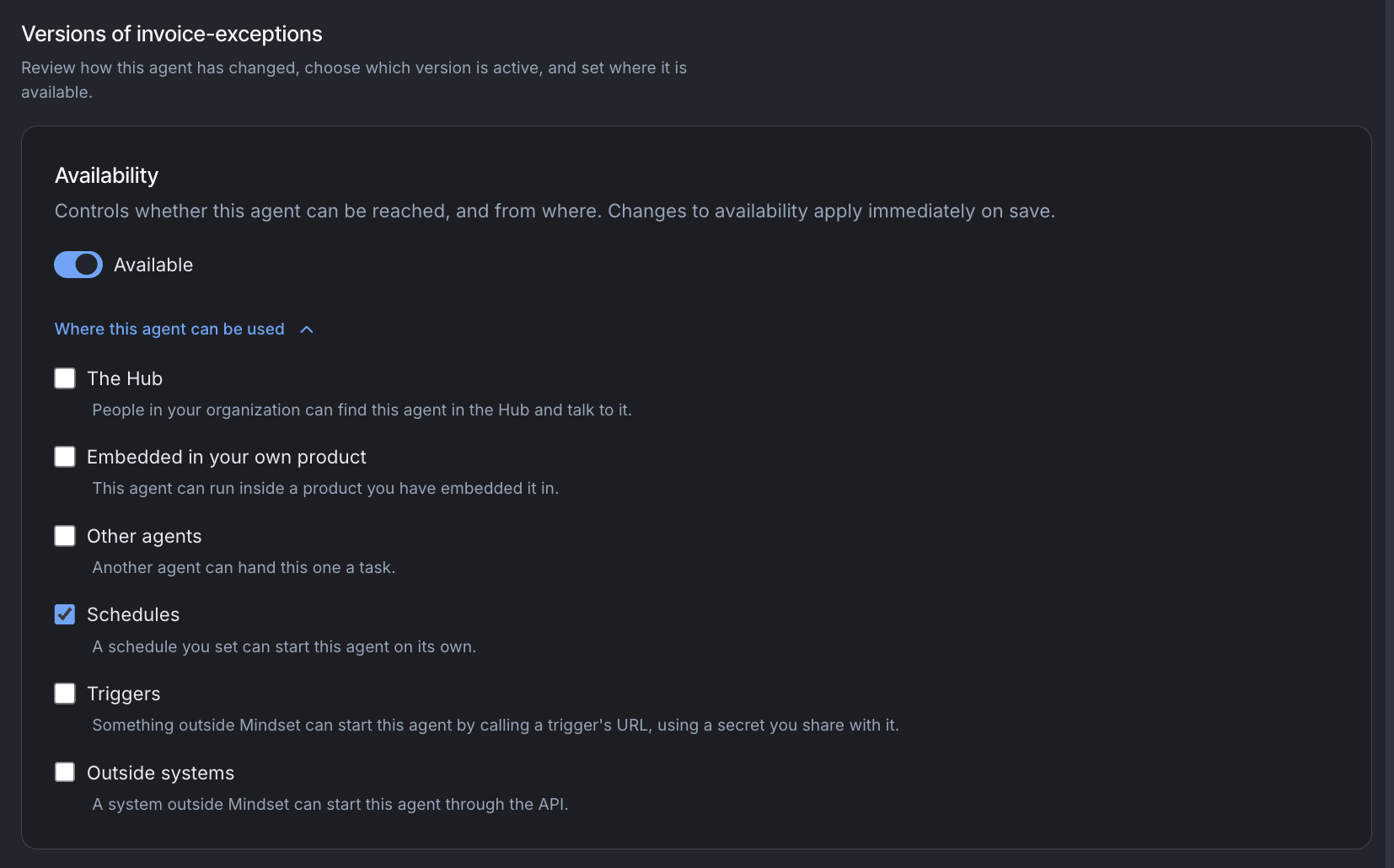
Select the Where this agent can be used link below the switch to choose exactly where your agent is available. There are six places, and you can tick any combination.
| Checkbox | What it means |
|---|---|
| The Hub | People in your organization can find this agent in the Hub and talk to it |
| Embedded in your own product | This agent can run inside a product you have embedded it in, so your own customers can use it inside your app |
| Other agents | Another agent can hand this one a task, so it can work as a helper to a lead agent |
| Schedules | A schedule you set can start this agent on its own, for example every Monday morning |
| Triggers | Something outside Mindset can start this agent by calling a trigger's URL, using a secret you share with it. For example, another tool could start it when a new form is submitted |
| Outside systems | A system outside Mindset can start this agent through the API, using your organization's API key |
Triggers and Outside systems look alike, but they are separate so you can open one without the other. With Triggers, another tool starts the agent through its own trigger link and secret. With Outside systems, your own systems call the agent directly with your organization's API key.
A word on those keys. A key belongs to one environment and works only there, and an environment can have several live keys at once. "Your organization's API key" means the organization owns the key rather than a person. It does not mean one key works everywhere. If a key is used against a different environment, the request is refused as though that environment did not exist.
How the switch and the checkboxes work together
- If you switch the agent on with nothing ticked, all six boxes are ticked and your agent is available everywhere.
- If you switch it on with some boxes already ticked, your choice is kept.
- If you switch it off, the checkboxes are grayed out but remembered. When you switch back on, your agent returns to the places you had chosen.
New agents start switched off
A new agent starts with Version 1 saved, no active version and every checkbox unticked. Nobody can reach it until you decide where it should be used.
When Orca or the Agent Builder builds a team of agents for you, the helper agents only get Other agents ticked. They can take work from the lead agent without being open to anyone else. The lead agent is left for you to switch on.
When an agent is available
An agent is available only when it has all three of these:
- An active version
- Its Available switch turned on
- At least one checkbox ticked
If anything is missing, the agent shows an Unavailable badge. The badge appears when any of these is true:
- The Available switch is off.
- No version of the agent is active.
- The agent is not turned on anywhere it can be reached.
If you switch an agent on before any version is active, the page reminds you that nothing can reach it until you activate one.
Admin access
Organization admins can open, edit and test an agent whatever its availability, even with every box unticked. This lets you build and try an agent privately before anyone else can reach it.