Docs / Deploy
Mindset AI in your own AWS account
The architecture and setup process for self-hosted AWS deployments.
The Mindset platform runs as a self-hosted deployment inside your AWS environment, on your model keys, behind your network controls. Your data, your agents and your configuration stay where you put them. This page describes what that deployment looks like, what we need from you to build it, and how it stays current afterwards.
This describes the architecture and set up process for self-hosted AWS deployments. If you are planning a deployment, talk to us and we will confirm the specifics for your environment.
01. The stack
What it is built on
One container image, a managed Postgres database and a handful of standard AWS services. Nothing exotic, nothing that needs a platform team to learn a new toolchain.
The whole platform ships as a single container image: the API, the agent runtime and the web application in one process. That is a deliberate constraint rather than a simplification: one artefact to deploy, one thing to roll back, and no orchestration between internal services for your team to reason about or monitor.
It runs on ECS Fargate, so there are no servers or clusters in your account to patch or scale. Tasks come and go against your load, AWS maintains the underlying host, and the deployment is defined entirely by a task definition you can read.
We deliver the infrastructure as a CloudFormation template. You own it and you run it. There is no state file to host, no extra binary to install and no tool version to keep in step with ours. You deploy a template from the console or the CLI, and AWS tracks the stack, reports drift and rolls back a failed change on its own.
Agents are the interface, not a feature
Every capability in the platform is callable by an agent as well as by a person, because both go through the same service layer. The same surface is exposed over MCP, which means your own tooling and your own agents can drive the platform directly, and it is how your data, configuration and the agents you build are exported whenever you want them, without asking us.
02. The environment
What the deployed environment looks like
A private VPC in your account and your region. Nothing is publicly reachable except the load balancer, and traffic only ever leaves towards the model providers you have chosen.
| Application | TypeScript on Node. One image, one process, serving both the API and the web application. |
| Data | PostgreSQL on Amazon RDS, with vector search for retrieval. A second, separate database holds the append-only audit record. |
| Objects | Amazon S3 for conversation history and generated assets, encrypted with your own KMS keys. |
| Credentials | AWS Secrets Manager. Model keys and integration credentials are held there and referenced, never stored in the database. |
| Edge | An Application Load Balancer with AWS WAF in front, an ACM certificate on your own hostname, and access logs delivered to your S3. |
| Models | Your provider accounts and your keys: Amazon Bedrock, Anthropic or OpenAI for inference, and your choice of embedding provider for retrieval. |
| Sign-in | Google sign-in or email and password. Federation with your own identity provider is on our roadmap. |
Every request enters through WAF and the load balancer, which is the only source the application tasks accept. The tasks sit in private subnets with no public address, and the only traffic leaving your account goes to the model providers you configured.
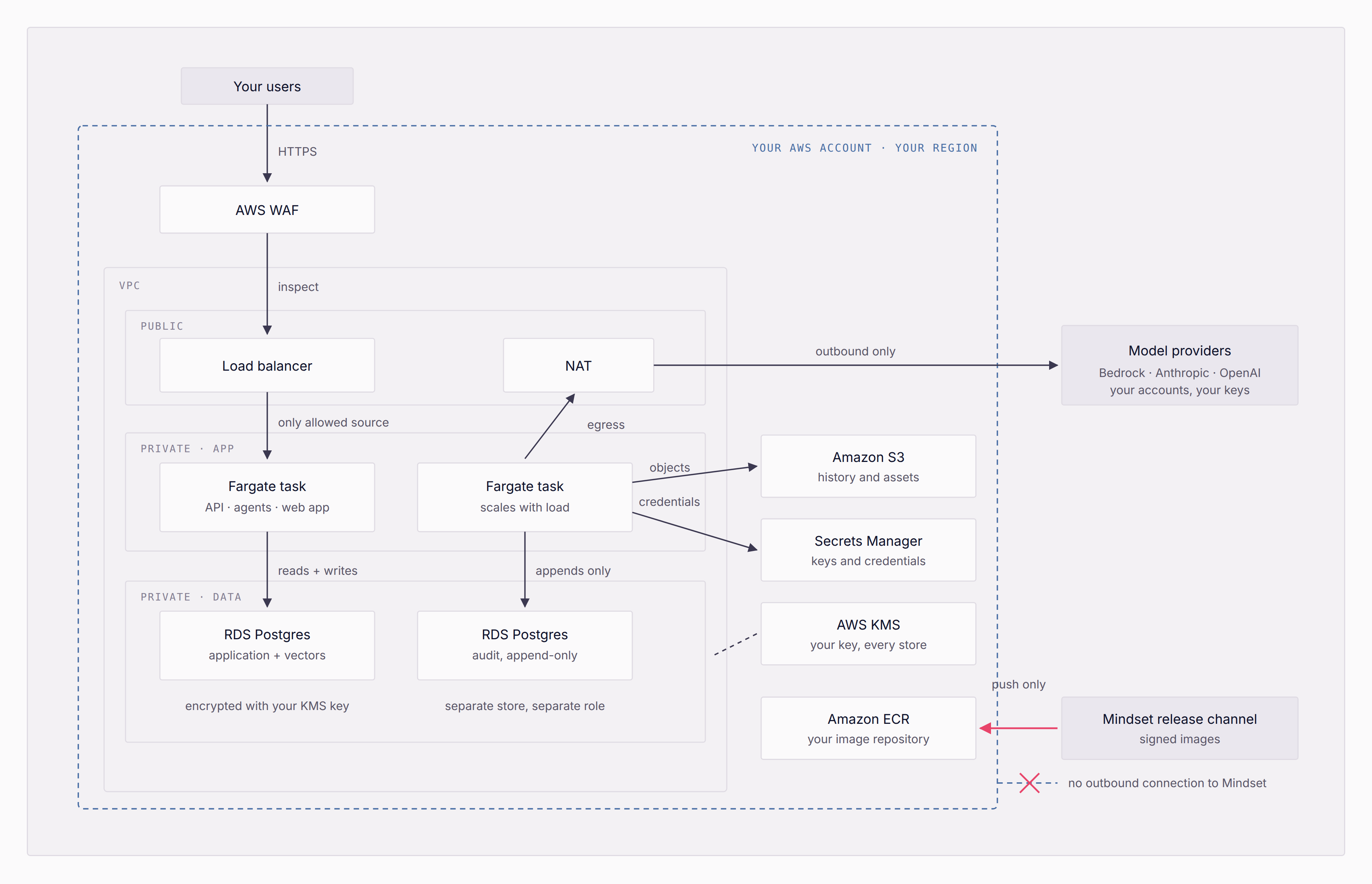
The connections above describe the kinds of connection rather than a partition: either task reaches any store. Release images are pushed inbound to your own registry; nothing calls back out to us.
Architecture: what lands in your account
| Resource | Purpose | Notes |
|---|---|---|
| VPC + subnets | Private network for the application and databases | Public subnets carry only the load balancer and NAT |
| ECS Fargate service | Runs the platform container | No servers or clusters to manage |
| Application Load Balancer | Terminates TLS, routes to the tasks | The only publicly reachable component |
| AWS WAF web ACL | Managed rule groups and rate limiting at the edge | Attached to the load balancer; you tune the rules |
| ACM certificate | TLS on your own hostname | DNS-validated in your zone |
| RDS PostgreSQL | Application data and vector retrieval | Not publicly accessible |
| RDS PostgreSQL (audit) | Append-only audit record | Separate store, separate database role |
| S3 bucket | Conversation history and generated assets | Public access blocked, versioned |
| S3 bucket (logs) | Load balancer access logs | Retention is yours to set |
| Secrets Manager | Model keys and integration credentials | Access scoped by resource prefix |
| KMS key | Encryption at rest across every store | Your key, your key policy, your revocation |
| ECR repository | Holds the platform images you deploy | We push, you deploy |
| CloudWatch log group | Application logs | Never leaves your account |
| IAM roles | Task execution and task runtime identity | Least privilege, scoped to the above |
The security posture, by default
The template ships with the controls already in place, rather than as recommendations in a runbook. Application tasks have no public address and accept traffic only from the load balancer's security group. WAF managed rules and rate limiting are attached at the edge, with access logging on so that what the edge did is a matter of record. Every store is encrypted with a key you control, and the audit record lives in a separate database with a role that can append but cannot rewrite.
Because the whole environment is a CloudFormation stack, what protects it is visible in your own tooling rather than something you take on trust. The stack records exactly what was deployed, and AWS drift detection reports anything changed outside it, so your team can audit the security position directly, on your own schedule, without asking us.
What does not happen
- No call-home. The deployment makes no connection to Mindset infrastructure. Nothing about your usage, your content or your configuration is reported to us.
- No licence kill switch. Images live in your registry and run from your account. Your ability to run the platform does not depend on reaching us.
- No Mindset control plane in the request path. No component of ours sits between your users and your deployment.
- No data leaves for us. Your data, configuration, content and the agents you build stay in your environment, and all of it is exportable at any time through the API and MCP.
Regions and residency
A deployment lives in one AWS region and holds its own data. Where you need data to stay in more than one jurisdiction, you run more than one deployment: each independent, each in its own region, with no shared database between them. AWS charges for all of it go directly to your account, on your own commercial terms with AWS.
03. Getting it built
How we get it built with you
We work alongside your team rather than handing over a document. You provision in your own account, with us in the room. Standing the deployment up is the first stage; building your first use case on top of it is the next.
What we need from you
Five things, and they are the whole list. Everything else is ours.
| An AWS account you control | In the region you want the deployment to live in, with someone able to provision networking, databases and IAM. A dedicated account is cleanest, but not required. |
| A container registry and a role to push into it | An ECR repository in your account, and one cross-account role that lets us push signed builds to it. That is how releases reach you, and it means nothing at runtime depends on us. |
| A hostname and the ability to change DNS | The platform runs on your own hostname. We need it decided early, because sign-in redirect addresses are matched exactly and changing the hostname later means reissuing them. |
| Your model provider credentials | Keys for your chosen inference provider and your chosen embedding provider. You hold them, you set the spend limits, and the providers bill you directly. |
| A named engineer for the setup window | One person with provisioning rights, reachable in a shared channel while we stand it up. This is consistently what decides whether a deployment takes days or weeks. |
The split matters more than the sequence: we supply the template, the images and the expertise, and your team performs every action inside your own account. Nobody from Mindset needs standing access to your environment for a deployment to happen. Note where this flow ends: a live, validated deployment. Building your first use case starts from there and is its own stage of work.
The stages
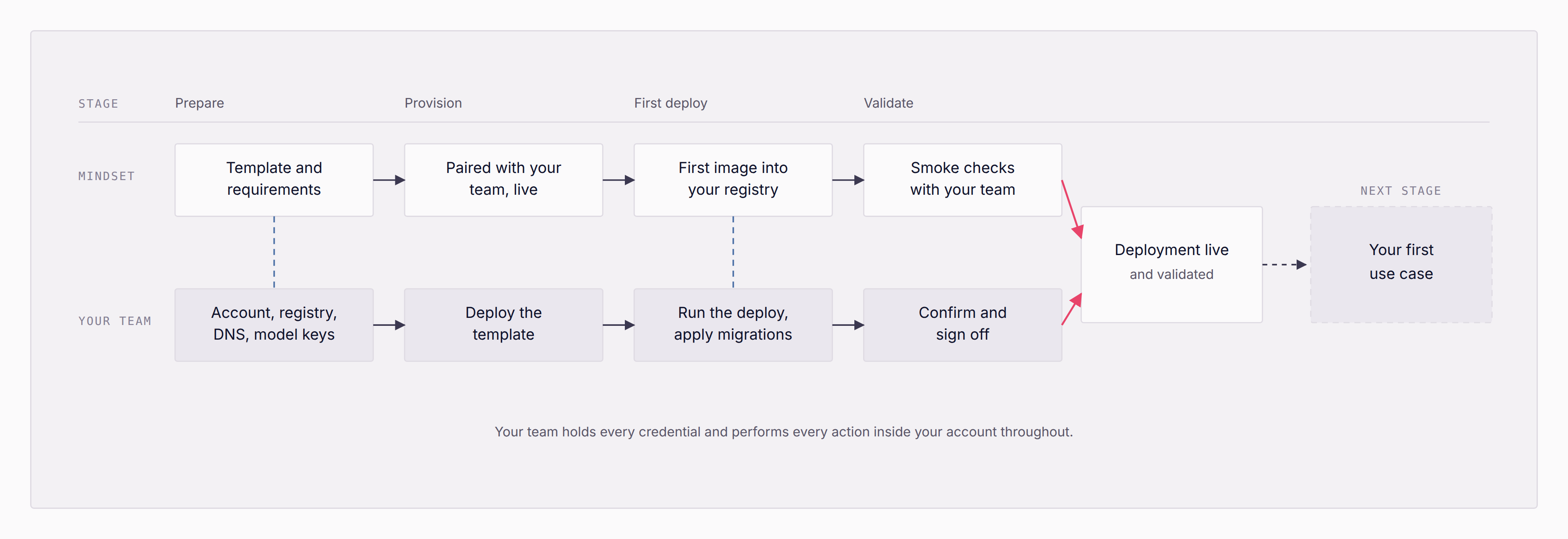
| Stage | Mindset | Your team |
|---|---|---|
| Prepare | Template and requirements | Account, registry, DNS, model keys |
| Provision | Paired with your team, live | Deploy the template |
| First deploy | First image into your registry | Run the deploy, apply migrations |
| Validate | Smoke checks with your team | Confirm and sign off |
| Deployment live and validated | → | Next stage: your first use case |
Your team holds every credential and performs every action inside your account throughout.
- Prepare. We confirm the shape for your environment, send the template and the exact IAM policies we need, and agree what the first use case is and how you will judge it.
- Provision. Your team creates the account prerequisites and deploys the template, with us alongside in a shared channel. Nothing about this step requires access for us.
- First deploy. We push the first signed image to your registry. You run the deploy and the migration step, both inside your own network.
- Validate. Smoke checks against the running deployment alongside your team, so it is confirmed working in your environment rather than assumed from ours.
- Then: your first use case. With the deployment live, the work moves inside the product: configuring and testing your first use case, with our enablement team alongside yours. That is its own stage of work, and it is where the value actually shows up.
04. Staying current
How it stays updated and supported
We ship releases to your registry. You decide when to apply them. Nothing upgrades itself, and nothing requires us to reach into your account.
A release is not just a new image, so we do not ship one. Each release arrives as a bundle: the image, the infrastructure template version it expects, the database migrations that go with it, notes on anything an operator has to do, and a clear statement of whether it can be rolled back. Those parts are versioned together, so there is never a question of which template goes with which image.
The release path
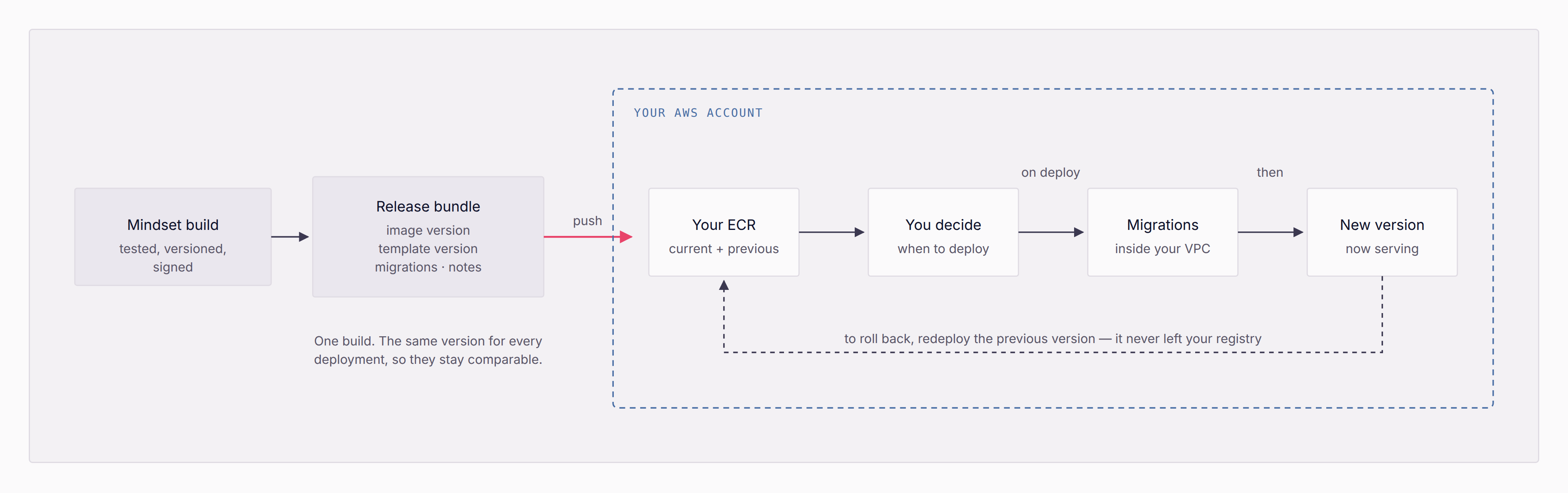
| Step | What happens |
|---|---|
| Mindset build | Tested, versioned, signed. One build, the same version for every deployment, so they stay comparable |
| Release bundle | Image version · template version · migrations · notes |
| Push → your ECR | Current + previous versions held in your own registry |
| You decide when to deploy | Every decision after the push is yours |
| On deploy → migrations | Run inside your VPC |
| New version now serving | To roll back, redeploy the previous version: it never left your registry |
The arrow crosses the boundary in one direction only: we publish into your registry, and every decision after that is yours. Rolling back is not a special procedure: the previous version is still in your own registry, so you redeploy it.
Upgrading on your own schedule
You deploy the release you want, when you want it. Database changes are designed so that the version you are running keeps working against the migrated schema, which is what makes it safe to roll the image back without touching the database. Where a release cannot be rolled back, the notes say so before you start rather than after.
We support a defined window of recent releases and test the upgrade path across it, so skipping a release is expected rather than risky. If you have stayed further back than that window, we will get you current. We would just rather tell you that plainly than let you discover it during an incident.
Support
Maintenance, patching, version upgrades and bug fixes are part of the subscription, and self-hosting does not change that. What we warrant is the software and its maintenance: the infrastructure it runs on is yours, and its uptime is in your hands, which is the honest consequence of it being your account.
In practice, support happens in a shared channel with direct access to the people who build the platform, alongside regular reviews covering usage, roadmap and what to build next. Because the deployment does not report to us, we will ask you for logs when we are diagnosing something, a deliberate trade for the fact that nothing about your environment is visible to us by default.