Docs / Connecting systems
Connect a system
For connecting the finance system, getting real operations on it, and knowing exactly what your agents can and cannot do to it.
Start with the agents in the admin portal
You do not have to build any of this by hand. Orca or the connections agent is the front door. Tell it what you are trying to do: "I need the invoice agent to be able to look up purchase orders in our finance system" and it provisions what the job needs: the connection, its operations, API testing and more.
What a connection is
A connection is a link to one outside system. It has a name, the address of the system, and the login details for it. Those login details are held by us. They are not held by the agent and they never reach the model.
For the invoice exceptions workflow you need two: your finance system, and a knowledge base holding your supplier contracts. This article is about the finance system.
What an operation is
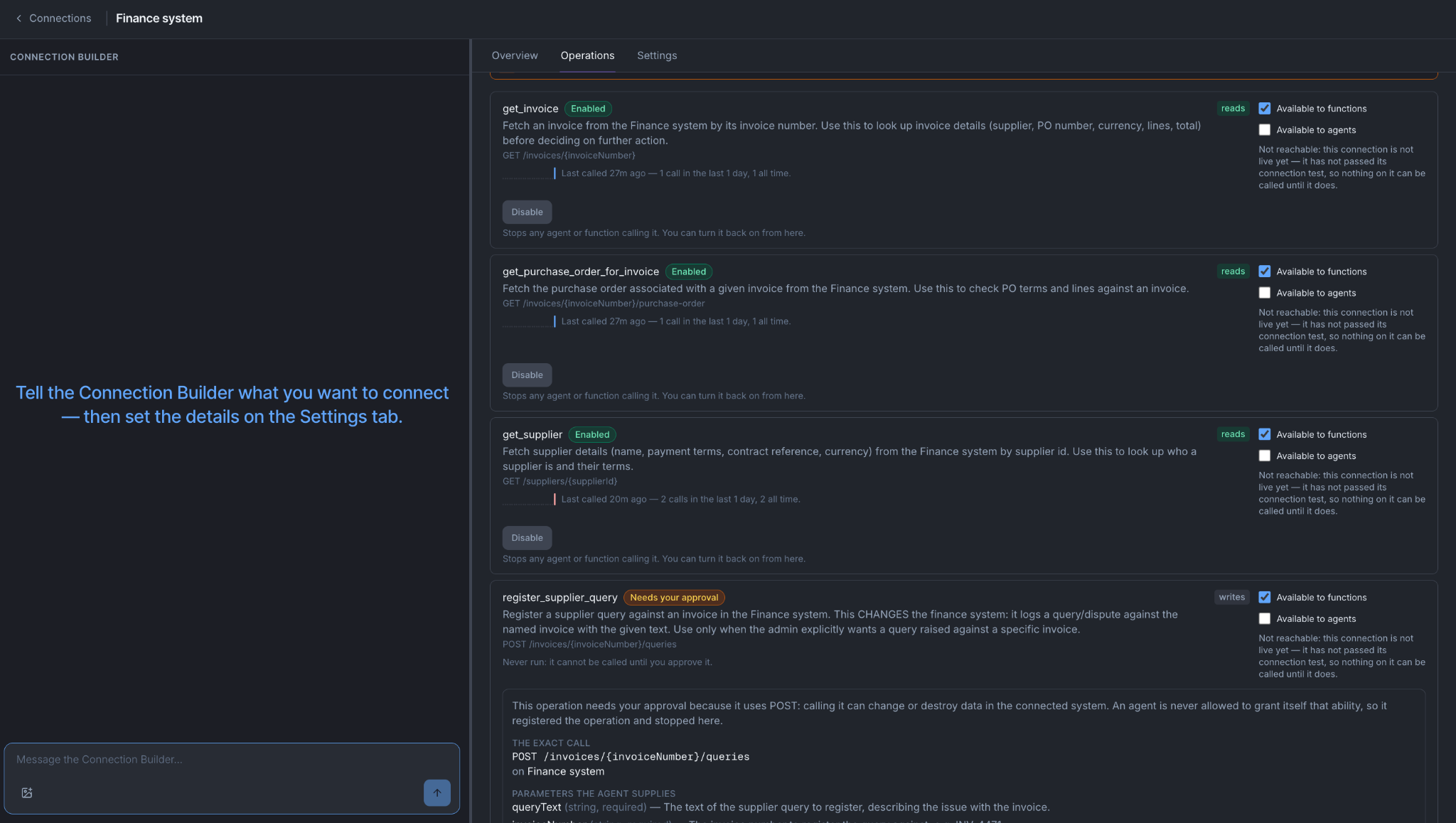
An operation is one specific named thing an agent can do on a connection. It has a fixed input, a fixed output, and it is marked as either a read (it fetches something) or a write (it changes something).
An agent is never given "the finance system". It is given operations, one at a time:
| Operation | It takes | It returns | Kind |
|---|---|---|---|
| Get an invoice | An invoice number | The invoice and its line items | Read |
| Get the purchase order for an invoice | An invoice number | The PO and its line items | Read |
| Get a supplier | A supplier ID | The supplier record, including payment terms | Read |
| Register a supplier query | An invoice number and the text of the query | Confirmation that the query is registered | Write |
Operations, not connections, are what get given to an agent. The complete list of what your agents can do to your finance system is the list of operations you enabled on this connection. You can read that list. So can your auditor.
You do not write the operations by hand
Create the connection, point it at the finance system, supply the login details, then press Discover on the Overview tab.
Everything it finds comes back as a list of candidates. Nothing switches itself on.
| What you connected | What Discover does |
|---|---|
| A system that publishes a description of its own API | Looks in the standard places on that host, using your login details, and brings back every operation it finds described there |
| A system whose API is documented on a web page instead | You paste in the address of one documentation page and it reads that page. Your login details are not sent to it |
| A database | Looks at the tables, and separately works out what your database login is actually allowed to do |
Enabling an operation proves it works
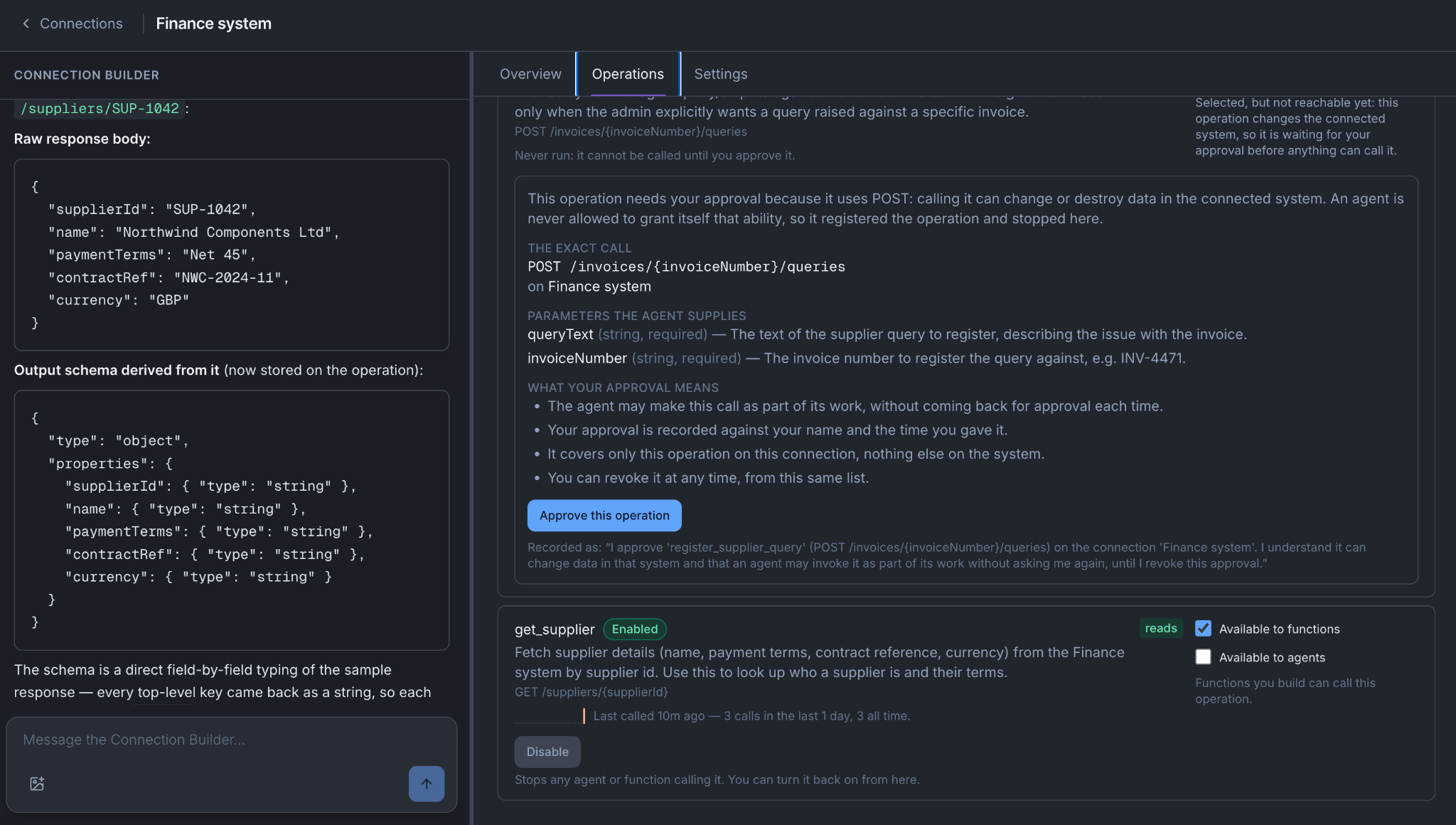
Mindset runs the operation once, for real, and only enables it if it worked.
For an operation on an API, here is what happens:
You press enable on "get purchase order" for an invoice number task. You are asked for an input to try it with, and you give it a real invoice number: INV-4471. Mindset makes one real call to your finance system with your login details. As a result:
- You find out now whether it works. If the login details are wrong, or the path has changed, or the operation needs a parameter nobody mentioned, it fails here, while you are sitting looking at it, instead of in the middle of a run next Tuesday.
- The output shape is taken from the real response. "Output shape" means the list of fields that come back and what sort of value each one holds. Mindset reads that off the response that actually arrived. If the documentation says the field is called
unit_priceand your finance system returnsunitPriceExVat, the operation is defined as returningunitPriceExVat, because that is what it returns.
That second point is what keeps the rest of the workflow standing up. Step two of the invoice-comparison function pulls the line items out of this operation's response. It is written against fields that came back from a real purchase order. Had the shape been copied from the documentation instead, the function would be reading fields that do not exist, every run would produce an empty list of lines, and nothing would error: the invoice agent would simply report that it found no differences on every invoice you gave it.
For a query on a database, two things happen instead:
Say your supplier payment terms live in Postgres and you are enabling a query that reads them.
- Your privileges are checked first. If your database login cannot read the suppliers table, enabling stops and hands you the exact
GRANTstatement to send to whoever owns that database. You do not have to work out what to ask for. - Then the query is test-run against the live database, inside a transaction that is rolled back. It runs on real data, so you see real rows and a real output shape, and the database is left exactly as it was.
For a tool on an MCP server, one extra thing is true:
Enabling works the same way: we call the tool once, for real, and take the output shape from what actually came back. That matters more here than anywhere else, because an MCP tool's declared input is whatever the server chose to publish about itself. The response is fact.
The extra thing is that you say whether it changes anything. An operation you authored against an API is marked read or write because you said which it was when you authored it.
A server publishes tools; it does not reliably tell us which of them change the world. So you mark it, and you are the one who knows.
Get this wrong in the safe direction if you are unsure. A read marked as a write costs somebody an approval click. A write marked as a read means an agent changed something in a system of yours and nobody was asked.
Three separate things are true of every operation
Whether an agent can actually do something to your finance system is three questions, not one. They are answered in different places, often by different people, and every one of them is checked again each time the operation runs.
| The question | Where it is answered | |
|---|---|---|
| 1. Enabled | Is it switched on at all? | On the connection, in Connections |
| 2. Offered to | Who has been given it: which agents, which functions? | In the Agents workspace, on the agent's Resources tab, under Add resource |
| 3. Approved | If it changes something, has a person approved that change? | On the approval link a person opens, or by an org policy |
Here is why those are three questions:
- An operation that is enabled and offered to nobody. You have just enabled "register a supplier query". It has been proved to work: Mindset made a real call and it went through. Nobody has been given it. It is not in any agent's resources and no function calls it. Nothing in your org can invoke it, and nothing will, however capable the agent is. Question one is about the connection. Question two is about who is holding it.
- An operation that is offered and still waiting for its write to be approved. Now you add that same operation to the invoice agent, at stage four only. The agent can call it, and on the next run it does: it writes the query, calls the operation, and the run finishes normally. The supplier does not receive anything. What was recorded is exactly what would be sent, and it waits for somebody in finance to open a link, read it, and approve it. So the agent holds the operation and still cannot cause anything to happen in the outside world. Being offered an operation is not permission for its effect.
- A read answers the third question with "not required". "Get the purchase order" changes nothing, so there is nothing for anyone to approve. It is enabled, it is offered to stage one of the agent and to the invoice-comparison function, and when either of them calls it, it happens immediately.
Put together, that is the finance connection for the invoice workflow:
| Operation | 1. Enabled | 2. Offered to | 3. Approved |
|---|---|---|---|
| Get an invoice | Yes | The agent at stage 1, and the comparison function | Not required, it is a read |
| Get the purchase order | Yes | The agent at stage 1, and the comparison function | Not required, it is a read |
| Get a supplier | Yes | Nobody yet | Not required, it is a read |
| Register a supplier query | Yes | The agent, at stage 4 only | Pending, on every single query |
Two consequences:
- All three are checked when the operation runs, not when it was handed out. If you revoke the operation on the connection, an agent that already holds it stops being able to call it straight away, including in a conversation already under way. That is the fastest way to cut something off.
- Turning any one of them off is enough to stop it. You do not have to unpick the other two.
If you connected an MCP server, the tool list is not yours
Everything above holds for an MCP server exactly as it does for an API or a database. Where an operation came from decides how we call it. It never decides how it is governed: the same three questions, the same approval on writes, the same instant effect when you revoke.
One thing has no equivalent anywhere else, and it is worth understanding before you build on one. Whoever runs that server can change it. They can add tools, remove them, rename them, or change what an existing tool accepts or does. They do not have to tell you, and on an internal server run by another team, they usually will not.
In practice:
- A tool you never enabled cannot be used, however many the server adds. New tools arrive as candidates, off, like everything else. The server offering something is not you enabling it.
- A tool you did enable can change underneath you. The name stays the same, the behaviour does not. Nothing you configured is wrong; the thing you configured it against moved.
- Re-run Discover when you know the server changed, and re-check anything that matters.
If the team running the server is inside your organisation, the cheapest fix is not technical: ask them to tell you before they ship a change. If it is a third party, prefer reads, and be deliberate about which writes you enable.
The Connection Builder will tell you which tools are worth having. MCP servers vary enormously. Some publish tools with clear names, described inputs and a stated purpose; some publish forty tools with one-word names and no description at all. The agent on the left of the Connections workspace reads what came back and says so before you enable anything. Take it seriously: the model chooses which tool to call from the description, so a bad description is a bad choice made on every single run.
Check you reached the right account
A connection that saves without complaining proves that a form was filled in correctly. It does not prove you are talking to the account you think you are.
Most login details work across several accounts, environments or workspaces. A credential pointed at the wrong account returns perfectly valid data. Nothing errors, nothing looks odd, and the purchase order that comes back is quietly somebody else's. This is the failure that survives longest, because there is nothing to notice. It usually gets found weeks later by somebody downstream who says the numbers do not look right.
So check, once, before you build anything on top:
- Open the Data preview tab, or Query console for a database.
- Run one read on its own. Get the purchase order for
INV-4471. - Look at what comes back and find one value you can verify somewhere else. The supplier name, the PO total, the date it was raised.
- Have somebody in finance open the same purchase order on their screen and compare.
If your Test environment is pointed at a sandbox copy of the finance system, do the same check there, against a record you know exists in the sandbox.
How operations that change something behave
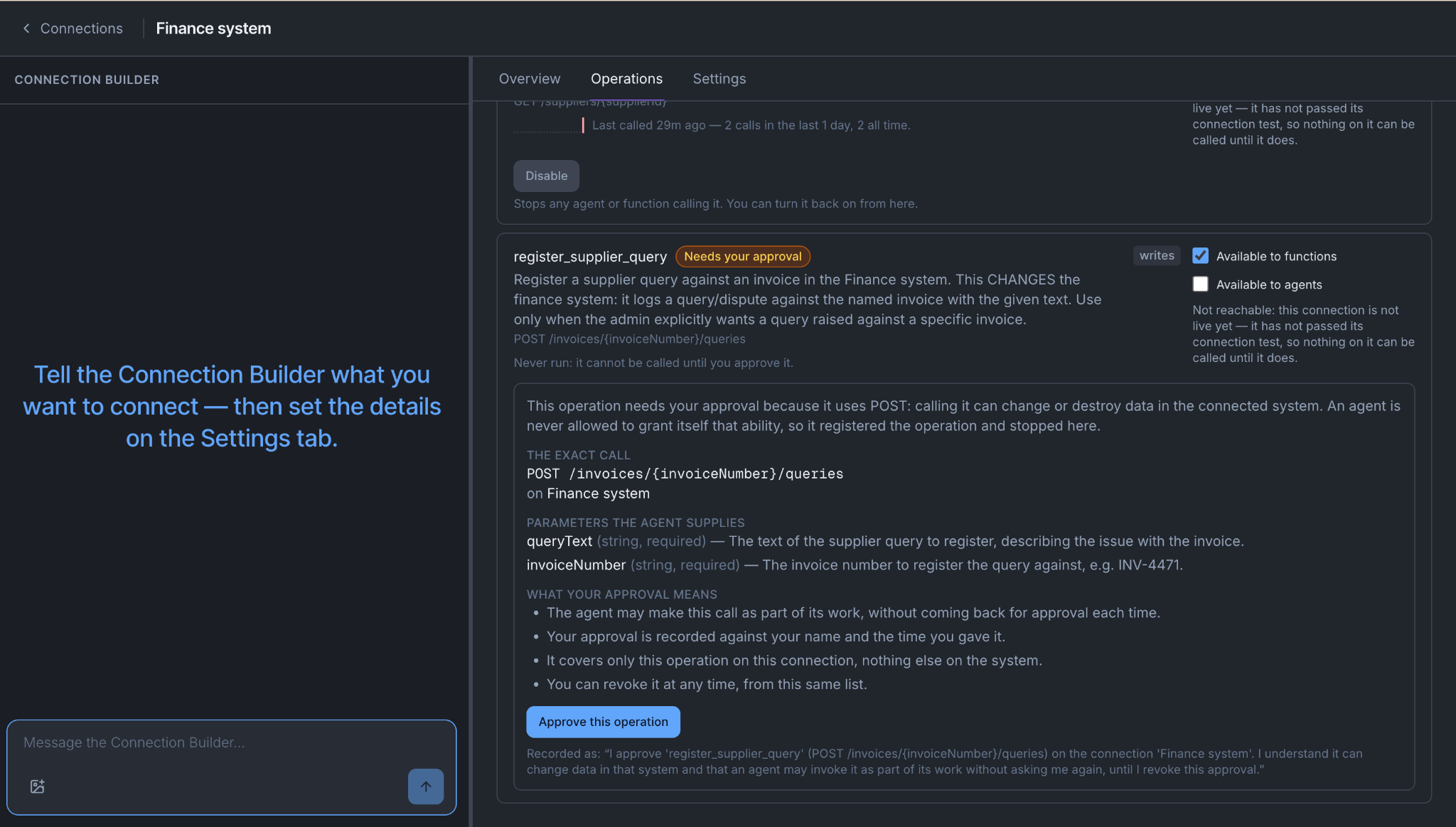
A read happens when the agent calls it. A write does not.
When the invoice agent reaches stage four and calls "register a supplier query":
- The agent records exactly what it would send: the invoice number and the full text of the query.
- The run carries on and finishes normally. The agent reports that the query is registered and waiting.
- An approval link is produced. A person opens it in their own browser, reads what is about to happen, and approves or refuses it.
- Only then does anything reach your finance system.
An agent can never approve a write. Not its own, not another agent's. There is no setting on the operation that changes this. The only thing that changes it is an org-wide policy you set deliberately in Settings, described in Set up your workspace, and when a policy stands in for a person the record names the policy rather than inventing somebody who approved. Revoking an approval is never undone by a policy.
How to do it
- Connections → New. Pick the system, name it for the system it reaches rather than the project you are doing, and supply the login details.
- Press Discover on the Overview tab.
- Enable the smallest read you need and look at what comes back.
- Check one value you can verify independently, as above.
- Enable the rest of the reads, then the write.
- Give the operations to the agent: the agent's Resources tab, Add resource, then Apply & make live.
Step six is in the Agents workspace, not here. The operation picker lives there, inside Add resource. Enabling an operation makes it available to be given out; giving it out is a separate act, by you, on a particular agent. See What saving actually does.
The tabs
Which tabs you see depends on what you connected.
| Tab | What it is for |
|---|---|
| Overview | Discover, and the state of the connection. Always there |
| Tools | Enable, disable, hide and test individual operations |
| Operations | Approvals, revoking, and who each operation is offered to |
| Knowledge | For knowledge connections: check what a search returns |
| Query console / Data preview | Run a read on its own and look at the result |
| Settings | Name, description, login details |
Everything here saves immediately.
When it does not work
Discover finds nothing. The system does not publish a machine-readable description of its API. Paste the address of its documentation page instead, or describe the endpoint you need to the Connection Builder.
Enabling fails on a database query. Read the error. It names the privilege your login is missing and gives you the GRANT statement to send to the database owner.
Enabling fails on an API operation with an authorisation error. The login details are valid but scoped to something narrower than this operation needs. This is a good failure to get: it is the same error you would have got mid-run.
It works here and the agent still cannot call it. Work through the three questions in order. Enabled? Given to this agent, and applied and made live? And if it is a write, is it waiting on an approval nobody has opened?
The data is right but from the wrong place. Check the account, not the connection. A valid response from the wrong account looks exactly like a valid response.
You're done when
- One read has returned data you have verified against what finance can see on their own screen.
- Every operation the workflow needs is enabled, and you can say who each one is offered to.
- Your write is either waiting for approval or was approved by a person who meant to approve it.
- You can answer all three questions for any operation on the connection without opening more than one tab.