Docs / Your first automation
From skill or spec to agent
For anyone with a working Claude skill, or an MCP server running on a laptop, who wants it running somewhere the company owns.
What this is
Orca is the provisioning conductor. The name is short for Orchestrator. You tell it what you want, it looks at what your org already has, it proposes a plan, and then it stops and waits for you. Nothing is built until you approve the plan.
Orca writes nothing itself. Each piece is built by the specialist for that kind of thing: the Connection Builder builds connections, the Function Builder builds functions, the Agent Builder builds agents. Orca's job is working out what is needed, in what order, and handing each piece to whoever builds it.
For the invoice exceptions workflow, what you paste in is the skill somebody in finance already wrote. What comes out is four things: a connection to the finance system, a knowledge base of supplier contracts, the invoice-comparison function, and the agent that uses all three.
How to do it
- Open Orca from the workspace rail on the left.
- Paste the skill in. All of it, instructions and examples. There is no file upload yet, so paste the text.
- Answer its questions. Orca briefs you before it plans. Expect questions about which systems the skill touches and what it is allowed to change.
- Wait while it takes an inventory. It reads what your org already has (connections, functions, knowledge bases, other agents) so it can propose reusing something rather than building a second one.
- Read the plan card and edit it. This is the part that matters, and it is covered below.
- Approve. Orca then builds only the rows marked create, in dependency order: the connections first, then the functions that call them, then the agent that uses both.
If what you have is an MCP server rather than a skill, the shape is the same. Tell Orca what the server is and what its tools do. It becomes a connection, and each of its tools becomes an operation on that connection, which is then something you can give to an agent. See Connection types.
The plan card
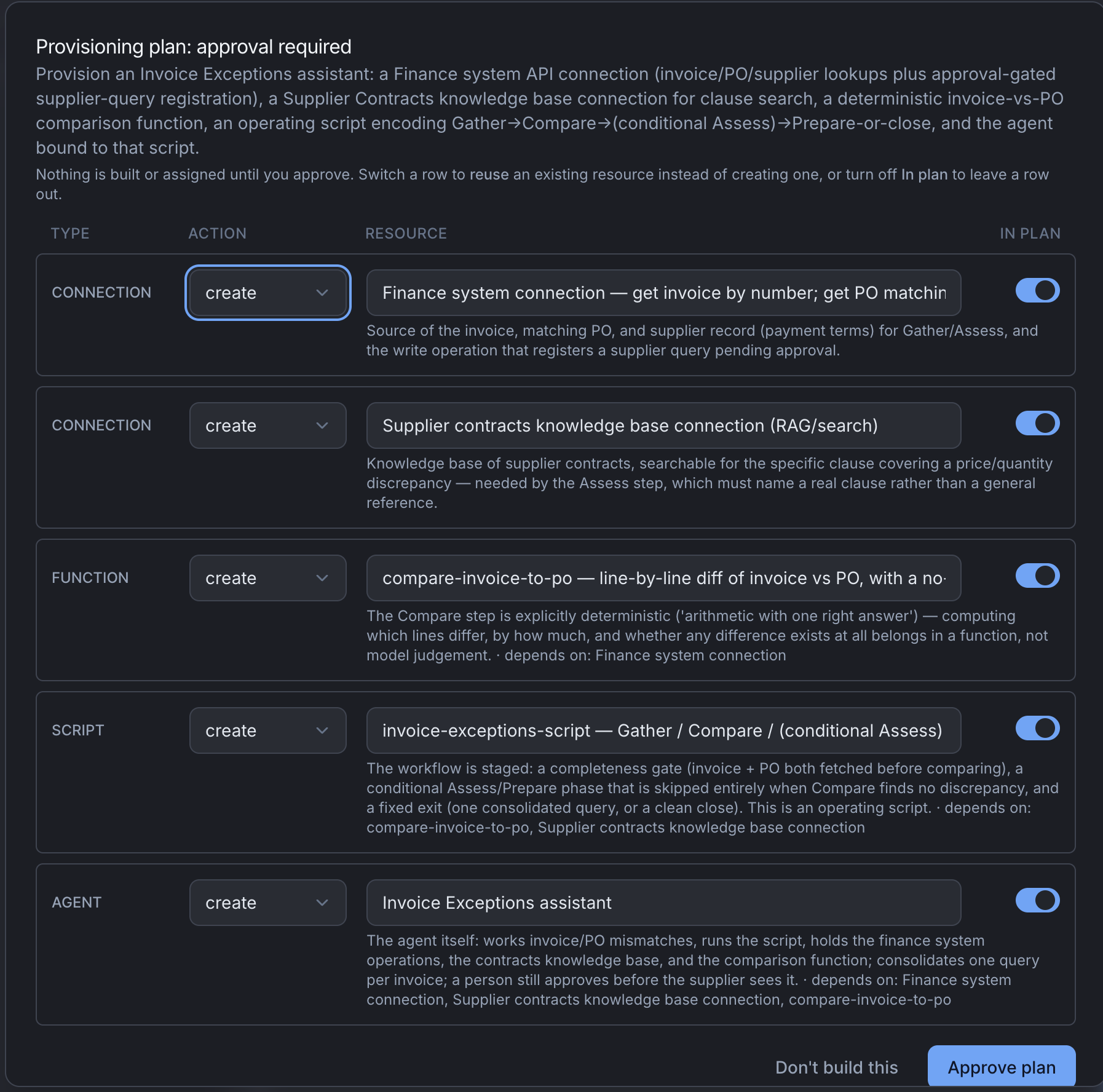
The plan arrives as a card that fills the surface, and the conversation genuinely stops there. Orca is waiting on you.
Every row is one thing Orca proposes, and every row has three controls:
| Control | What it does |
|---|---|
| Action | create or reuse. Switch a row to reuse when you already have something that will do the job |
| Identity | The name the new thing will get, or the name of the existing thing you are reusing |
| In plan | Turn the row off, so that nothing happens for it at all |
For the invoice exceptions skill, expect four rows:
| Row | Action | What it is |
|---|---|---|
| Finance system | create | A connection to your finance system's API, which the read operations and the one write will hang off |
| Supplier contracts | create | A knowledge base holding the contracts, so stage three has something to search |
| Invoice comparison | create | The function that compares an invoice to its purchase order line by line |
| Invoice exceptions agent | create | The agent itself, with a script, a system prompt, and the other three as its resources |
Approving does not build anything by itself. It hands your edited plan back to Orca, which then builds the create rows. Rejecting builds nothing.
What to check before you approve
Is anything a create that should be a reuse
This is the most valuable edit you can make on this card, and the one most often missed.
Orca always looks for something it can reuse before it proposes to build one. Check each row anyway, because it can only find what is discoverable. An existing connection named for the project that produced it, rather than for the system it reaches, will be missed.
A real version of that: your org already has a connection called Q3 spend review, made by somebody in finance three months ago, and it points at exactly the finance system this plan wants. Orca is looking for something that reaches your finance system and sees a row named after a quarterly exercise. It proposes a create, correctly, on the evidence it has.
How to check, in about a minute:
- Open Connections in another tab and read the list.
- Ignore the names. Look at what each one actually reaches: the host for an HTTP connection, the database for a Postgres one, the content loaded into a knowledge base.
- If one of them reaches the same system as a create row, switch that row to reuse and put the existing name in the identity field.
- Do the same for functions. A function called
PO checkermay already do what the invoice-comparison row proposes.
What a duplicate actually costs you. Two credentials for the same system, so two things to rotate and two things to notice when one expires. Two sets of operations to enable, keep in step and review. Two rows in Observability where one system should be, so "what have we been doing to the finance system" becomes a question with two answers. None of that is fatal on day one and all of it is annoying by month six.
When a create is right even though something exists. If the existing connection uses a credential scoped to a different account, or points at a sandbox, or belongs to a team who will be surprised to find your agent using it, build a new one. The point of the check is that you decided, not that you always reuse.
Are the writes where you expect
For the invoice exceptions agent there should be exactly one thing that changes anything: registering the supplier query. Everything else is reading. If the plan proposes a write you did not ask for, such as updating the invoice record, turn that row off and ask Orca why it was there.
Is a function doing something that needs judgement
A function gives the same answer every time for the same input. Comparing an invoice to a purchase order line by line qualifies. Deciding whether a difference is acceptable under the contract does not, and belongs in the agent's script. If a proposed function's name contains a word like "assess" or "decide", read what it does before you approve it.
Does the script look right
Orca will usually propose a script for the agent as part of the plan. It is a proposal you confirm and adjust, not something you have to accept as written. Read the stages: for the invoice agent you want gather, compare, assess, prepare, in that order, with the write only available at the last one. Adjust it now if it is wrong, or later on the agent's Script tab. See Write a script.
What you get
Open the agent afterwards and everything is there, and everything is editable: Overview, Chat, Script, Resources, System Prompt, Settings, Testing and Embed, plus Triggering.
The Agent Builder is docked on the left of every one of those tabs. It is the same agent throughout; what changes is which tab it is looking at. To change something, say so there rather than hunting for the right form.
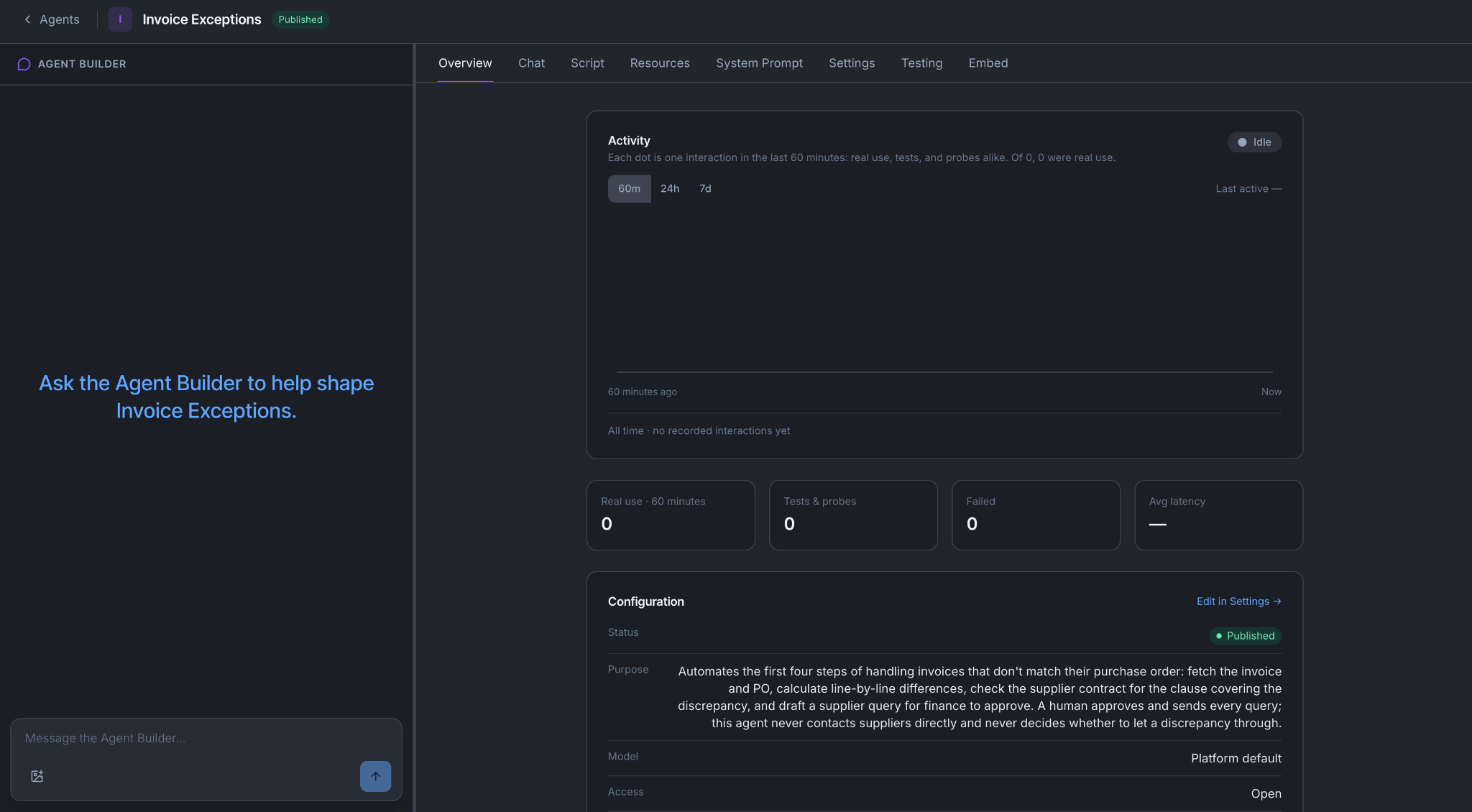
What you do not get yet is a working agent. The connections Orca created exist but have no credentials and no operations on them, which is the next job. See Connect a system.
When it does not go well
The plan is one enormous agent. Skills written as one long instruction are often two or three jobs stuck together. Tell Orca to split it. If the split it proposes cuts through something that belongs together, say that and it will re-plan.
A row names a system nobody has connected. Orca can plan the connection, but somebody has to supply the credential and enable the operations. That is Connect a system, and it is your next article either way.
Part of the skill logged into a website and clicked through its screens. That part does not come across, because there is no operation to make out of it. Ask whoever owns that system whether there is an API behind those screens.
You approved a plan you now regret. Nothing is destroyed. Open what it built and change it, or archive it and run Orca again with a better brief.
You're done when
- The agent exists and you can open it.
- You can name every connection, function and operation in the plan, and say why each one is there.
- You checked the Connections list yourself, rather than trusting that every create row needed to be a create.
- You approved a plan you had edited, not the one you were first shown.