Docs / Sharing
Publish and share an agent
For giving colleagues an agent you have built, and knowing exactly what you have handed them when you do.
An agent is a bundle of resources
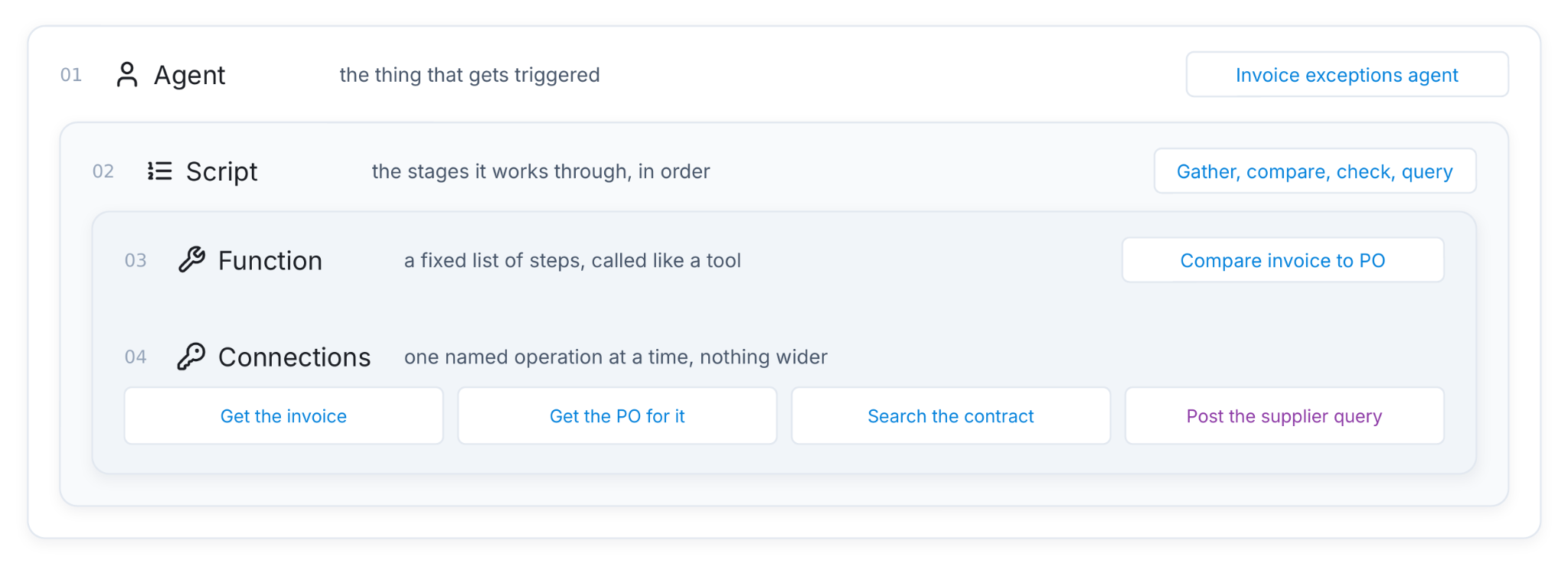
An agent is a bundle: a system prompt, a script, a model, and a set of resources it may reach. Giving somebody the agent gives them everything in that bundle, exercised through that agent.
The invoice exceptions agent's bundle:
| In the bundle | What it lets the holder do |
|---|---|
| Four operations on the finance system | Read an invoice, read its purchase order, read a supplier record, register a supplier query |
| The invoice-comparison function | Compare an invoice to its PO, line by line |
| The supplier contracts knowledge base | Search your supplier contracts |
| The script and system prompt | Only in that order, only with the tools each stage offers |
They cannot open the finance system. They cannot pick a different operation. They get those four things, through this agent, in the order the script allows. That is the whole of it.
Publishing is an access decision
So the question to ask before you publish is not whether this person should be an admin. It is narrower and easier to answer: should this person be able to do these specific things to these specific systems?
For the invoice agent: publishing it to somebody in finance gives them read access to your finance system through those four operations, and the ability to register supplier queries for approval. It does not give them the ability to approve those queries, and it does not give them anything else on the finance system, because nothing else was enabled and offered to this agent.
Ask it that way and the answer is usually obvious. Somebody in accounts payable, yes. A contractor doing a two-week piece of work on something unrelated, no.
Two routes, and both give the same bundle
| Route | What it is | Who it suits |
|---|---|---|
| The Hub | The colleague-facing conversation surface. The agent appears in their list and they talk to it there | Anyone. No setup on their side |
| MCP | The agent is reachable from their own Claude or Claude Code, as a tool they can call | People who already work in Claude and want it alongside what they are doing |
They are the same grant. The bundle does not get smaller because somebody reached it from Claude, and it does not get larger. The run is recorded the same way, the script runs the same way, and a write still waits for a person either way.
Setting up the MCP route on the reader's side is in Use your agents from Claude. You do not have to be an admin to use it.
How to do it
- Open the agent and go to Settings, where the agent's own status and who it is published to both live.
- Check the bundle first. Go to Resources and read what is in there. If it says "1 pending change", press Apply & make live, because a resource sitting in the draft is not part of what you are about to hand over.
- Publish it to the people or the group who need it. Name the smallest set that needs it today.
- Tell them which route they are using. For the Hub, nothing further. For MCP, point them at Use your agents from Claude.
- Watch the first few runs in Observability → Resources, filtered to that agent. What colleagues actually ask an agent is never quite what you designed it for.
What you should see
- The agent appears in the Hub for the people you published it to, and not for anyone else.
- Their first conversation produces a run in Observability with their name on it.
- If they get as far as stage four, an approval is waiting for a person in finance, not a supplier query already sent.
Things to be aware of
- A conversation already running keeps what it started with. If you remove a resource while somebody is mid-conversation, that conversation carries on with what it had and picks up the change next time they start. If you need access gone this minute, revoke the operation on the connection. That is checked every time it runs.
- Publishing to users is separate from the agent's own status. An agent has a status of draft, published or archived, which is about the agent itself. Who it is published to is a different setting. Changing one does not change the other.
- Read the bundle out loud before you publish, in the form "this gives them the ability to X against Y". If that sentence is uncomfortable, split the agent rather than publishing it narrowly and hoping.
When it does not work
- They cannot see it in the Hub. Check the agent's own status and who it is published to separately, in that order. Then check the environment: the Hub is scoped to one, and an agent published in Test does not appear in Production.
- They can see it and it cannot do anything. Something in the bundle is still in the draft. Open Resources and look for a pending change.
- They can use it and get an authorisation error from the finance system. That is the connection, not the publish. The credentials are held on the connection and are the same for everybody, so if it fails for them it will fail for you too. See Connect a system.
You're done when
- You can say, in one sentence, what publishing this agent lets somebody do to which systems.
- The Resources tab shows no pending changes.
- The people who need it can see it, and you have watched one of their runs.
- Anything that changes a system of record is still waiting for a named person.