Docs / Testing, improving and debugging
See and control what it costs
For answering what this is costing you, and then making it cost less without making it worse.
What this is
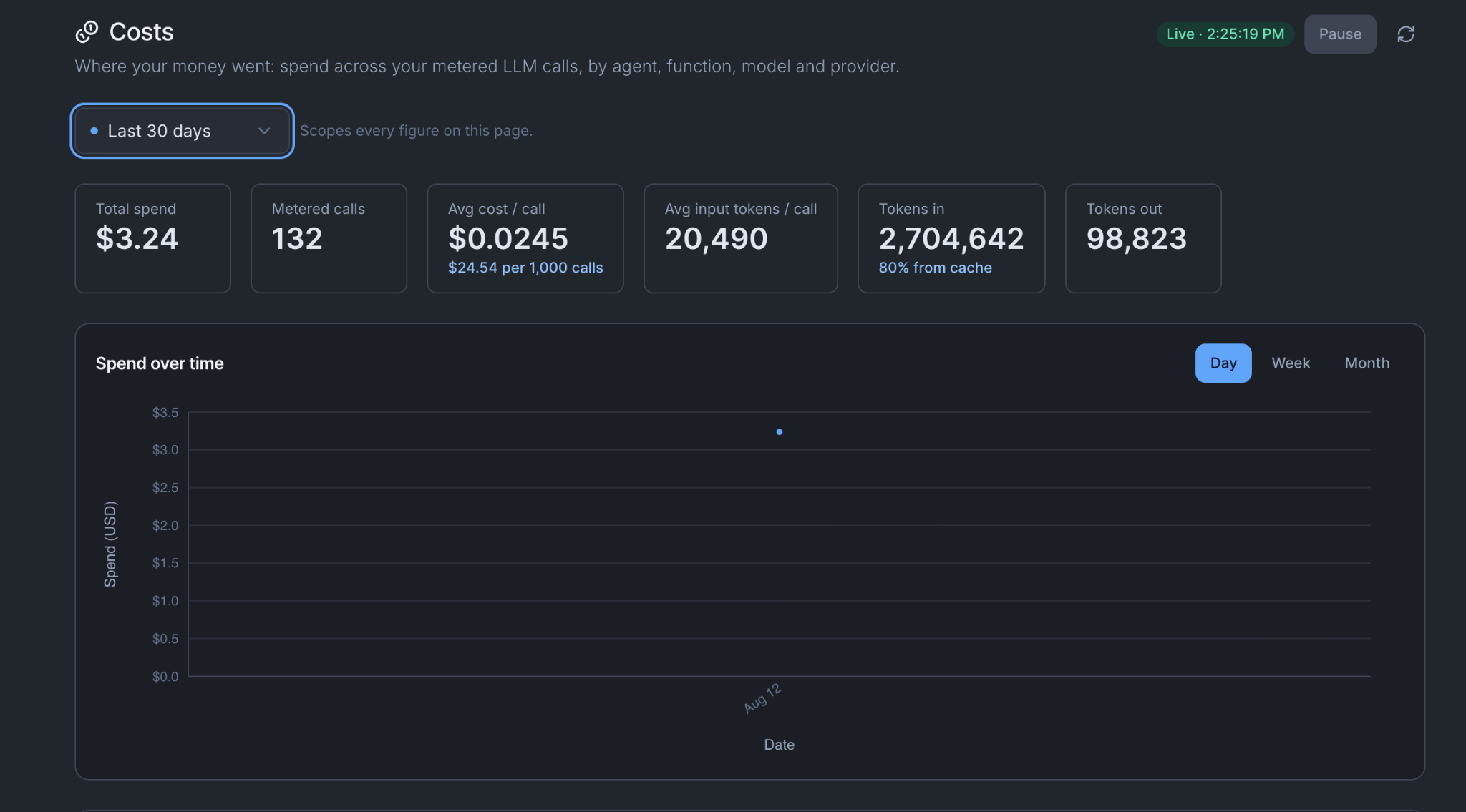
The Costs workspace. Every metered call is recorded with what it cost, so the number is what happened rather than an estimate. Six figures across the top:
| Figure | What it tells you |
|---|---|
| Total spend | The bill for the window you are looking at |
| Metered calls | How many chargeable calls were made |
| Average cost per call | Total divided by calls. The number to watch after a change |
| Average input tokens per call | How much is being sent each time. Usually the thing that is too high |
| Tokens in | With the percentage that came from cache |
| Tokens out | How much was generated |
Break it down five ways
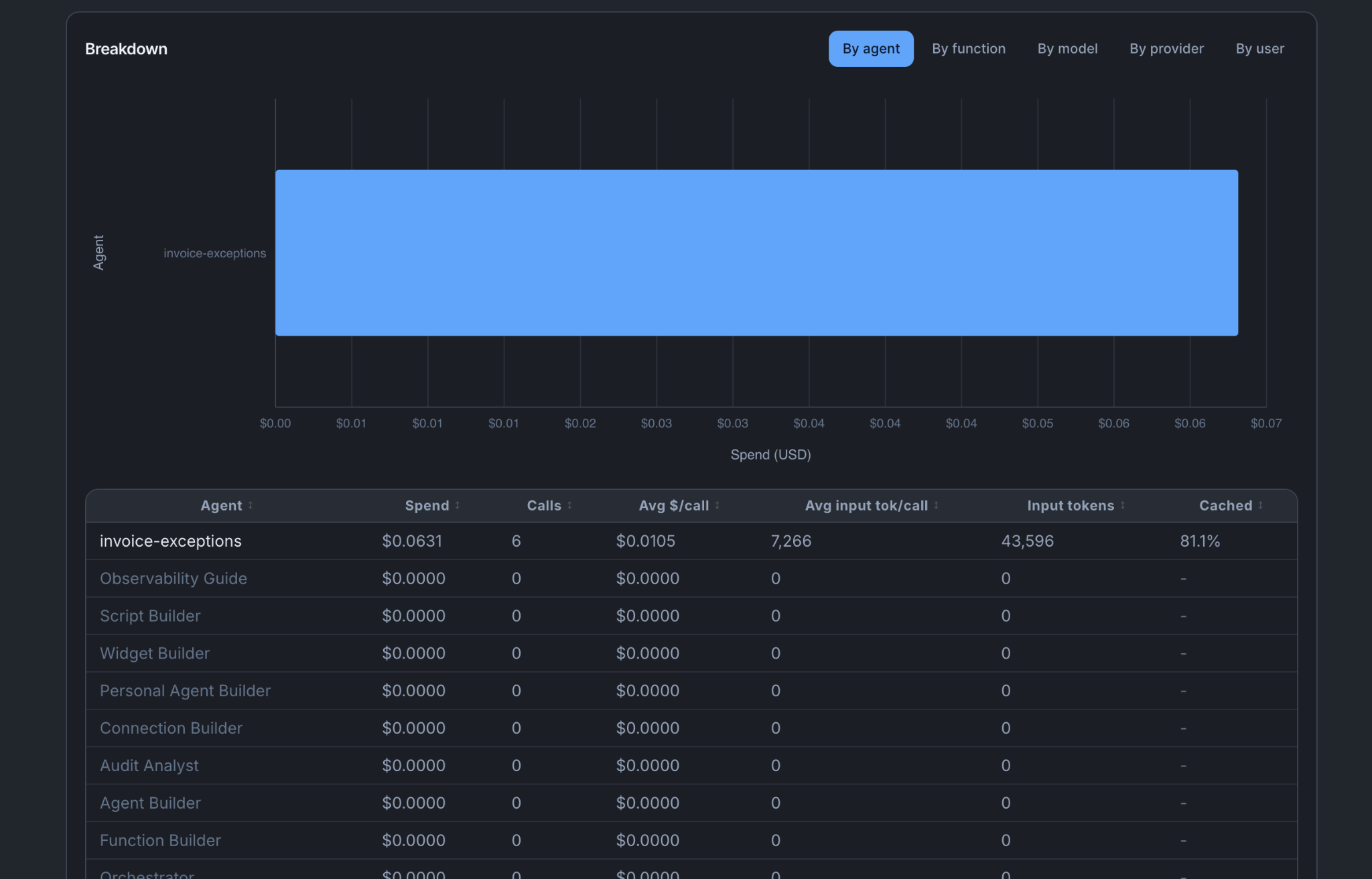
Each dimension answers a different question. Switch between them rather than picking one.
| By | The question it answers |
|---|---|
| Agent | Which piece of work costs the most. Start here |
| Function | Whether a function is being called far more often than you expected |
| Model | What you are paying for capability you may not need |
| Provider | The split across suppliers, for negotiation and for concentration |
| User | Who is using it. A single person generating most of the spend is a training conversation, not a cost problem |
For the invoice agent, by agent you get the total. By function you find the invoice-comparison function running four times per invoice because the agent is retrying a stage. By model you find stage three's judgement running on your largest model.
The cache column
Every record also carries what the same call would have cost without caching. Caching means the model provider charges less for content it has already been sent recently, which for an agent with a long system prompt is most of what it sends.
Compare the two numbers to see whether it is working. If the cached percentage on tokens in is low for an agent that runs constantly, something is changing at the start of every request and nothing can be reused.
The main lever to reduce cost: prove a cheaper model still passes
The largest saving available in most orgs, and it is measurable rather than a guess.
- Open the agent's Testing tab.
- Re-run the behaviour tests with the model swapped. A behaviour acceptance criterion is a situation plus a statement of what must be true about how the agent behaved.
- Compare the results side by side.
- Take the cheapest model that still passes every criterion. Every one, not most.
If the invoice agent passes all of its criteria on a smaller model, the smaller model is the right one, and you have the run to show anybody who asks.
A run with the model overridden is marked experimental. It cannot itself promote anything and it is left out of the health chart. So the comparison tells you which model to choose; changing the agent's model, publishing, and passing the pinned criteria is still a separate step.
Bringing it down
In the order that usually pays.
- Use a cheaper model, proved as above.
- Turn fixed work into a function. Anything with one right answer costs less as steps than as reasoning, and it stops varying. Comparing invoice lines to PO lines is arithmetic.
- Use checks instead of judgements. A check is a straight test of what was collected: fast and free. A judgement is another model reading the work, which is a second model call every time the stage runs. Keep judgements where the condition is about quality, like stage three naming a specific clause, and use checks everywhere the answer is yes or no.
- Return less. An operation that returns an entire invoice record when the function needs four fields sends the difference into the model on every call, and it lands in your average input tokens per call.
- Schedule for the rate the data changes. An agent running hourly against data that updates daily costs twenty-four times what it needs to. Match the schedule to the data, not to how often somebody might look.
Cost caps
A cost cap is a policy setting on a model connection, alongside the model itself, a token ceiling, PII handling and data residency. Set it where the model is configured, not on each agent.
Set one on anything scheduled before you leave it alone for a month. A cap is not a budgeting exercise; it is the thing that stops a badly worded instruction becoming an expensive week.
Things to be aware of
- Cost is per environment. A busy Test environment is real spend.
- Tests cost money. Tools execute for real during a test, and a criterion runs several times.
- The user breakdown is worth reading before the model breakdown, because usage patterns explain more totals than model choice does.
- Runs called from Claude over MCP appear here like any other, under the caller's name.
You're done when
- You can name your three most expensive agents and say why each is where it is.
- You have run one model comparison and either changed the model or can say why not.
- Every scheduled agent has a cost cap on its model connection.