The 12 things you do and don’t get with Gateways + Observability, and what to do instead
· 9 min read · Blog
Gateways and tracing are worth buying. Neither stops an agent before it changes a real system, or gets automations out of one person's account. Here's the fix.
The six things you do get
Six real jobs, and the reason to buy. Nothing below argues against having them.
- One entry point and one identity. Every agent goes through the same door, so you stop managing a separate login for every system.
- An inventory. Which MCP servers are running, and which tools each one offers.
- An allow-list. Which tools a given agent or team is permitted to find and call.
- Payload checks. Known-bad content blocked, and obvious personal data stripped on the way past.
- A trace. What an agent did, step by step, so you can work out why when somebody complains.
- Evals. Whether a change made the agent better or worse, before you ship it.
The six things you don't get
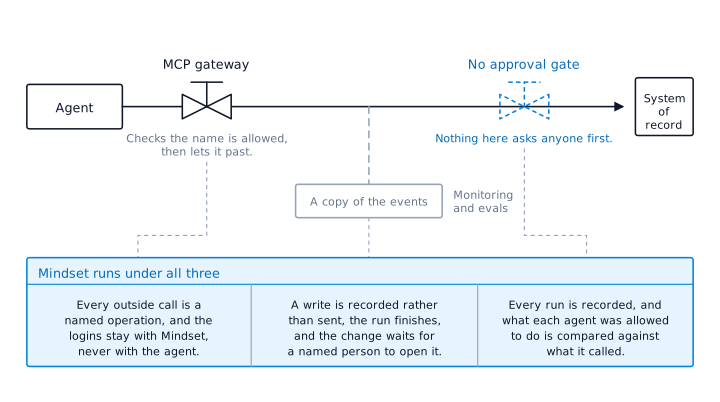
Anything that stops and asks a person first. Picture the line a call travels down, from the agent to the system it is about to change. A gateway checks the call is on the allow-list and lets it through. Monitoring writes down what happened, after it happened. So when an agent is about to change a customer record, raise a credit note or send a message to a client, there is no point where the change is held and somebody is asked to agree to it. Both products are built to let traffic pass, not to hold it.
A name against the change. The log tells you that a rule allowed the call and the call went out. It does not tell you that a person read what was about to change and agreed to it. Those are two different facts, and only one of them answers the question an auditor, a customer or your own board asks first, which is: Who decided this was right? A rule is something somebody wrote months ago. A name is somebody who looked at this change, on this day, and said yes.
Any difference between a read and a write. Fetching the purchase order for an invoice is the same shape of call as changing that purchase order. Allowed, or not allowed. But one of them you can undo by closing a tab, and the other has to be unpicked by a person. Neither product treats the two differently, so you cannot say "reads go straight through, changes wait" unless you build that part yourself.
The routes that never go through the gateway. A gateway only sees what points at it. It does not see an agent driving a browser inside a session your employee is already signed into. It does not see a script somebody put on a schedule. It does not see one agent handing work to another, or an agent that writes code and runs it. And it sees nothing at all inside a personal Claude or ChatGPT account, which is where the work you are trying to govern is sitting today.
Any link between what you approved and what then happens. This is the one that catches people out, because they believe they already approved it.
When you connect Claude or ChatGPT to an MCP server, somebody approves that connection once, on the day it is set up. Every call the agent makes through it afterwards is covered by that single yes. You approved the door, not the thousand things that walk through it. A gateway allow-list works the same way: You approved the tool, once, in advance, for every use of it from then on. Nobody is asked again about the fiftieth write.
And what you approved was a name. When an agent calls a tool, all the gateway sees is a name and some arguments:
update_customer_record, with a customer ID. It checks the name against the allow-list, finds it permitted, and lets the call through. What it never sees is the code sitting behind that name. The code was written by whoever built the MCP server, and they chose the name themselves. Nothing checks the two match, so a tool calledupdate_customer_recordcould read your entire customer table and your log would show a permitted call toupdate_customer_record.One approval, given once, for a label. Everything after that runs on trust.
An automation that keeps working when the person who built it is on holiday. The reconciliation flow your finance analyst built sits in her Claude account, under her login, and she is the only person who knows how it works. A gateway and a monitoring tool change none of that. She takes a week off and month end takes four days longer. She leaves and it goes with her.
All six are the same problem. There are three positions on the line between an agent and a system of record. A gateway holds the first, and its job ends when the call passes. Monitoring watches the third, from a copy, after the fact. The middle position, the moment just before the change is made, has nothing on it.
What to do instead
Keep the gateway. Keep the tracing. They are a step and they are worth the money. They are not the finish line, because the finish line is automations the company runs, and neither product runs anything.
1. Put your AI champions in charge of finding them
The people already building this are your AI champions whether anybody has used that word or not. They know what exists because they built half of it, and a list from them beats a survey from you.
So make it their job rather than a favour. One named person per function, a date, and the two tests below to work against. Read what your tenant admin tooling and your data loss reports already say as a cross-check, because that catches what nobody volunteers.
Then tell them the goal out loud, because it is the opposite of what they expect to hear from you. Keep building locally. Bring the best ones forward, not the safest ones. The best ones will usually also be the riskiest, because value and risk come from the same place, which is that the thing touches something real.
2. Decide which ones the company should own
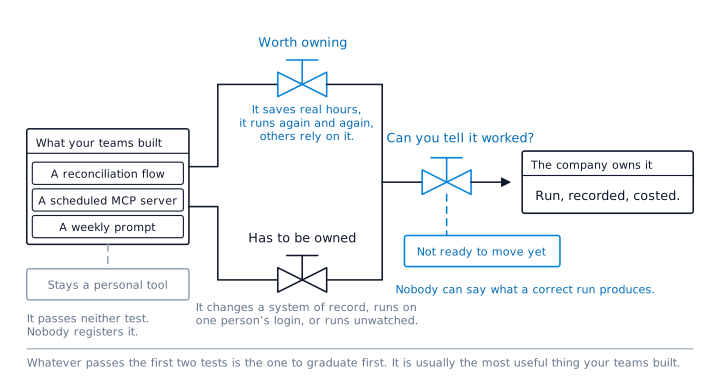
Two tests. One asks whether it is worth owning. The other asks whether you have a choice.
Is it worth owning? Two of these four.
- It saves real hours. Count them per month, across everybody who uses it.
- It runs again and again. Weekly or more, or on a schedule.
- More than one person relies on what it produces.
- Somebody would notice within a day if it stopped.
Does it have to be owned? Any one of these five.
- It changes something in a system of record.
- The change is hard to undo.
- It runs under one person's own login.
- It runs when nobody is watching.
- It touches regulated or reportable data.
Either test on its own gets this wrong. Risk alone means you only ever graduate the frightening things, which reads as a compliance exercise and kills the enthusiasm you spent six months building. Value alone means you graduate the popular things and leave the dangerous ones on laptops.
Pass either test and the company owns it. Pass both and it goes first, because the most useful thing your teams built and the thing most likely to hurt you are, almost always, the same thing.
Pass neither and it stays a personal tool. Nobody registers it, nobody reviews it, nobody interferes. Concede that part and the policy keeps working. A policy that catches everything catches nothing, because people stop telling you what they built.
One more, before it can move: Can you tell it worked?
The two tests above decide whether something should become the company's. This one decides whether it can yet, and it is the test people skip.
An automation that runs in somebody's account produces whatever it produces, and the only judge is the person watching. Once the company owns it, that is not good enough. You need it to give the same answer on a Thursday that it gave on a Friday, and you need a way to know when it has not.
So before anything moves, three things have to be true.
- Somebody can write down, in a sentence, what a correct run produces.
- You can point at real past examples of the job where the right answer is already known.
- The work breaks into stages, and each stage has something you can check.
If those are not true, it is not ready. Not because it is not valuable, but because nothing goes live here with a failing test, and a test needs somebody to have said what good looks like. That usually takes the person who built it an afternoon, and it is the most useful afternoon in the whole process, because it is the first time anyone has written down what the thing is supposed to do.
3. Move those ones onto a platform that runs them
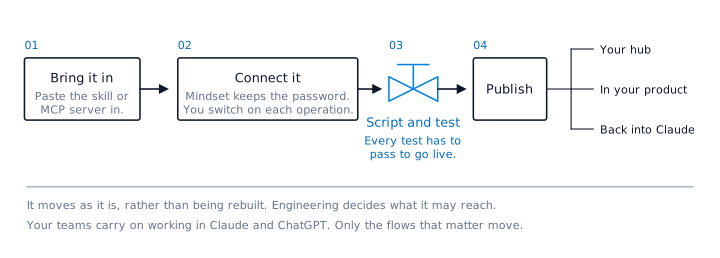
Mindset is the agent platform that runs your important, repeatable automations. An automation that qualifies moves as it is rather than being rebuilt.
Four steps. At the third you script the work as stages with success criteria, and every criterion has to pass before it can go live.
Once it is there, the rule underneath everything is one sentence. Everything the agent touches outside Mindset goes through a named operation, and there is no other route.
A named operation is one specific action, switched on by hand: Get the purchase order matching this invoice number, rather than access to the finance system. The agent is given operations, never the login behind them.
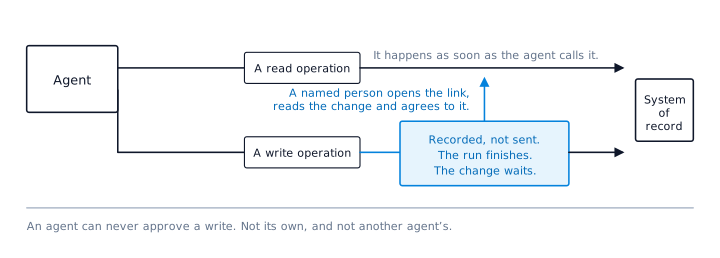
Reads happen when the agent calls them. Writes do not.
4. Keep it running
Ten minutes a day and half an hour a week, held by one named person with a backup. Daily: What failed, what is waiting for an approver, and what ran but did nothing. Weekly: The new agents and operations, and the comparison between what each agent was allowed to do and what it went and called.
Three conventions hold the rest together. Every agent has a named owner and a named deputy, so nothing depends on one person again. Personal tools stay personal and are not registered. Anything nobody has used gets archived.
What replaces each of the six
| What you didn't get | What you get once it runs here |
|---|---|
| Nothing stops and asks a person | A write is recorded rather than sent. The run finishes, and the change waits behind a link until a person opens it and agrees to it. |
| No name against the change | The approver is a named person on the run record, sitting next to the exact change they agreed to. |
| No difference between a read and a write | Reads happen when the agent calls them. Writes wait. The split is on by default, and it can only be turned off for the whole organisation, never for one agent and never for one operation. |
| Routes that never go through the gateway | Everything the agent touches outside Mindset is a named operation. There is no other route, so there is nothing to bypass. |
| One approval covers every use after it | The connection is approved once, but each write is asked about on its own. Operations are switched on one at a time rather than a server being allow-listed whole, and the login never reaches the agent, so a tool cannot use credentials it was not given. What each agent was allowed to do is then compared against what it went and called, and the difference is flagged. |
| Stops when its author is on holiday | The logins belong to the company rather than the person. Every agent has a named owner and a named deputy. |
What this is not
It is not a replacement for your gateway, and not a replacement for your tracing. Those answer what was called and what happened. This answers who agreed to it, and keeps the work running when its author is away.
It is also not a migration. Your teams carry on working in Claude and ChatGPT. Only the flows that matter move, and people reach those back over MCP, in Slack or Teams, or in a browser.